
Introduction
For a number of years, I’ve performed numerous Linux network installations on “legacy” BIOS systems with TFTP and PXELinux. This has been convenient when I’ve needed to build a lot servers, and has worked well when paired with Preseed automated installations on Debian systems or Kickstart automated installations on Enterprise Linux systems. However, BIOS has largely been superseded by UEFI; for better or worse, all computers now ship with UEFI firmware. It is also the default firmware mode on VMWare ESXi. With UEFI, PXELinux no longer works; now you must use GRUB2 over PXE. Recently I decided I wanted to learn how to do this with Debian, as I needed to install Debian 13/Trixie on four identical HPE ProLiant servers running UEFI firmware and wanted to do automated Preseed installations, as opposed to installing the OS manually on each server. This post explains how I was able to get this to work.
DHCP and TFTP setup
You will need to set up an “actual” DHCP server for this exercise—your ISP router probably won’t work here. The two DHCP servers I’m the most familiar with are the ISC DHCP server and Dnsmasq. I prefer the ISC DHCP server, because it uses a configuration file format similar to the Bind DNS server and is easy to manage with Ansible, but it has been superseded by the Kea DHCP server. The Kea DHCP server uses JSON for its configuration file, which I despise—there are so many opportunities to make mistakes; I guess they want you to manage it with the Stork GUI. If you don’t want to mess with GUIs or clunky JSON configuration files, but want to run something that is being actively-maintained, Dnsmasq is a good choice. It also provides a built-in TFTP server, meaning that you don’t have to configure this service separately.
First, I will cover installing and configuring ISC DHCP server. On Debian and Ubuntu, it can be installed with sudo apt install isc-dhcp-server. The main configuration file for this is /etc/dhcp/dhcpd.conf. When configuring this file for UEFI network booting, I borrowed heavily from this example: Enable UEFI support in the DHCP server. In fact, this guide was instrumental in helping me figure this out, despite the fact that it is for Enterprise Linux. The option arch settings for PXEBoot are borrowed from this guide; these are necessary for UEFI network booting. The below code snippet is a dhcpd.conf file similar to the one I run in my environment:
default-lease-time 600;
max-lease-time 7200;
authoritative;

option arch code 93 = unsigned integer 16;
if option arch = 00:07 {
    filename "debian-installer/amd64/bootnetx64.efi";
} else if option arch = 00:08 {
    filename "debian-installer/amd64/bootnetx64.efi";
} else if option arch = 00:09 {
    filename "debian-installer/amd64/bootnetx64.efi";
} else {
    filename "pxelinux.0";
}

subnet 192.168.40.0 netmask 255.255.255.0 {
  range dynamic-bootp         192.168.40.150 192.168.40.250;
  option subnet-mask          255.255.255.0;
  option broadcast-address    192.168.40.255;
  option routers              192.168.40.1;
  option domain-name          "example.net";
  option domain-name-servers  192.168.40.1, 192.168.40.2;
  next-server                 192.168.40.1;
}
The setting next-server will be the IP of your TFTP server. After creating or modifying the configuration file, enable the isc-dhcp-server with sudo systemctl enable –now isc-dhcp-server or if it’s already running, restart it with sudo systemctl restart isc-dhcp-server. If you’re using isc-dhcp-server, you will also need to install a separate TFTP server. On Debian, a TFTP server can be installed with sudo apt install tftpd-hpa. Usually no further configuration is needed with this service, which uses the /srv/tftp TFTP root directory by default.
For Dnsmasq, I installed it with sudo apt install dnsmasq and then uncommented the following line in /etc/dnsmasq.conf: conf-dir=/etc/dnsmasq.d/,*.conf. I then created a /etc/dnsmasq.d/01-lab.conf file similar to the below code snippet:
listen-address=::1,127.0.0.1,192.168.20.1
no-resolv
no-hosts
server=1.1.1.1
domain=ridpath.lab
dhcp-range=192.168.20.100,192.168.20.200,12h
dhcp-option=3,192.168.20.1
dhcp-option=6,192.168.20.2
dhcp-match=set:efi-x86_64,option:client-arch,7
dhcp-match=set:efi-x86_64,option:client-arch,8
dhcp-match=set:efi-x86_64,option:client-arch,9
dhcp-match=set:bios,option:client-arch,0
dhcp-boot=tag:efi-x86_64,debian-installer/amd64/bootnetx64.efi
dhcp-boot=tag:bios,pxelinux.0
enable-tftp
tftp-root=/srv/tftp
After creating the configuration file, I restarted Dnsmasq with sudo systemctl restart dnsmasq.
Setting up the TFTP server
For this exercise I used the Debian Netboot tarball, netboot.tar.gz, which contains all of the files necessary for starting a Debian installation over the network. For Debian 13, it can be downloaded from here. On the TFTP server, you can extract it as follows (note: you should be careful about overwriting existing files in /srv/tftp):
wget -P /tmp https://deb.debian.org/debian/dists/trixie/main/installer-amd64/current/images/netboot/netboot.tar.gz
cd /srv/tftp
sudo tar xzf /tmp/netboot.tar.gz
While in /srv/tftp, create a symbolic link to debian-installer/amd64/grubx64.efi: sudo ln -s debian-installer/amd64/grubx64.efi. tftpd-hpa seems to work without this, but Dnsmasq required it. After this, cd to debian-installer/amd64/grub. It was here that I ran into issues: I wanted to do MAC address-based provisioning, similar to what I have done with PXELinux. Per the GNU GRUB Manual, found here, it should support this. However, my experience was that it did not work: if I created a grub.cfg-01-MAC_ADDRESS file in debian-installer/amd64/grub, it would still only boot off the default grub.cfg. After some Googling, I ended up finding a workaround. First, this post mentioned creating grub.cfg with a single line that sources the grub.cfg MAC address file. However, the variable used in the example, $net_default_mac, contains the MAC address with colons; I wanted it to following the 01-MAC-address-with-dashes format that is used with PXELinux. This post provided me with a solution to this, splitting the MAC address up with a regular expression and turning it into the correct format. Using these two examples, I created the below grub.cfg in debian-installer/amd64/grub:
set dd="[0-9a-f][0-9a-f]"

regexp --set 1:o1 --set 2:o2 --set 3:o3 --set 4:o4 --set 5:o5 --set 6:o6 \
    ($dd):($dd):($dd):($dd):($dd):($dd) \
    $net_default_mac

set hwaddr="$o1-$o2-$o3-$o4-$o5-$o6"

source ${prefix}/grub.cfg-01-${hwaddr}
For the next step, you will need to know the MAC address of the system you’re installing the OS on. With virtual machines this is easy, but with physical hardware you might have to boot into a live CD or rescue disk to obtain it. If you’re installing Debian on an enterprise server with lights-out management, such as an HPE ProLiant with iLO, you can get the MAC address from there. Create the file in debian-installer/amd64/grub with something like sudo touch grub.cfg-01-$(echo “00:aa:bb:cc:01:02” |tr ‘:’ ‘-‘), then create it with something similar to the below snippet:
set default="preseed"
set timeout=5
menuentry "Preseed installation" --id preseed {
     set background_color=black
     linux    /debian-installer/amd64/linux auto-install/enable=true netcfg/choose_interface=auto netcfg/disable_autoconfig=true netcfg/get_ipaddress=192.168.20.74 netcfg/get_netmask=255.255.255.0 netcfg/get_gateway=192.168.20.1 netcfg/get_nameservers=192.168.20.1 netcfg/get_hostname=efi-vm1 netcfg/get_domain=ridpath.lab netcfg/hostname=efi-vm1 preseed/url=http://192.168.20.1/efi-vm1.cfg ---
     initrd   /debian-installer/amd64/initrd.gz
}
Note: if your system has a provision for a serial console (enterprise servers, KVM virtual machines, etc.), you can add something like the following after the three dashes (‐‐‐): console=tty0 console=ttyS0,115200n8. The above Grub configuration will pull the Preseed file from a web server and kick off the automated installation.
On systems with network cards that require proprietary firmware, you might also need to download the non-free firmware image and append it to the initrd using the below steps from this guide. Without it, the installer might fail to start. I needed to do this for the HPE ProLiant Gen 10 servers I was building, as well as for an Amazon mini-PC I have at home. Doing so though will make the initrd significantly larger and slows down the boot process; I recommended only doing it if you have to.
cd /srv/tftp/debian-installer/amd64
wget https://cdimage.debian.org/cdimage/firmware/trixie/current/firmware.cpio.gz
mv initrd.gz initrd.gz.orig
cat initrd.gz.orig firmware.cpio.gz > initrd.gz
Creating a Preseed file
In past posts, I’ve talked about creating Preseed files for automated installations of Debian. The Preseed is simply an answer file for the installer; it provides very minimal options for configuring the system, unlike the Kickstart files used for Enterprise Linux systems. For example, it doesn’t allow setting of VLAN identifier on the NIC. If the port your system is connected to is configured for multiple tagged VLANs, you will need to have your networking engineer set the “native VLAN” on the port in order to install Debian over the network. The Preseed file is hosted on a web server. Below is a code snippet of one I created. In my environment I use the apt-cacher-ng proxy to cache the deb files to save bandwidth, but this isn’t necessary and the mirror/http/proxy line can be set to blank. The password hash was generated with mkpasswd -m sha-512. For QEMU/KVM systems, qemu-guest-agent should be added extra packages parameter, d-i pkgsel/include: d-i pkgsel/include string sudo qemu-guest-agent.
d-i debian-installer/locale string en_US
d-i keyboard-configuration/xkb-keymap select us
d-i netcfg/choose_interface select auto
d-i netcfg/disable_autoconfig boolean true
d-i netcfg/get_ipaddress string 192.168.20.74
d-i netcfg/get_netmask string 255.255.255.0
d-i netcfg/get_gateway string 192.168.20.1
d-i netcfg/get_nameservers string 192.168.20.1
d-i netcfg/confirm_static boolean true
d-i netcfg/get_hostname string efi-vm1
d-i netcfg/get_domain string ridpath.lab
d-i netcfg/hostname string efi-vm1
d-i netcfg/wireless_wep string
d-i hw-detect/load_firmware boolean false
d-i mirror/country string manual
d-i mirror/http/hostname string http.us.debian.org
d-i mirror/http/directory string /debian
d-i mirror/http/proxy string http://192.168.20.44:3142
d-i passwd/root-login boolean false
d-i passwd/make-user boolean true
d-i passwd/user-fullname string Ansible User
d-i passwd/username string ansible
d-i passwd/user-password-crypted password $6$cxp7ruDPexnBdRIv$UrcJ2DyvZmrh1VYjSrh6d4rEvXEJEbce.gXzYCwcpSdTMEVODlUJvYymVmls4Xzn46.Gbm5RHLD1lNUrbz4mx1
d-i clock-setup/utc boolean true
d-i time/zone string UTC
d-i clock-setup/ntp boolean true
d-i clock-setup/ntp-server string 0.pool.ntp.org
d-i partman-auto/init_automatically_partition select biggest_free
d-i partman-auto/method string regular
d-i partman-lvm/device_remove_lvm boolean true
d-i partman-md/device_remove_md boolean true
d-i partman-lvm/confirm boolean true
d-i partman-lvm/confirm_nooverwrite boolean true
d-i partman-auto/choose_recipe select atomic
d-i partman-partitioning/confirm_write_new_label boolean true
d-i partman/choose_partition select finish
d-i partman/confirm boolean true
d-i partman/confirm_nooverwrite boolean true
d-i partman-md/confirm boolean true
d-i partman-partitioning/confirm_write_new_label boolean true
d-i partman/choose_partition select finish
d-i partman/confirm boolean true
d-i partman/confirm_nooverwrite boolean true
d-i apt-setup/cdrom/set-first boolean false
tasksel tasksel/first multiselect standard, ssh-server
d-i pkgsel/include string sudo
popularity-contest popularity-contest/participate boolean false
d-i grub-installer/only_debian boolean true
d-i grub-installer/with_other_os boolean true
d-i grub-installer/bootdev string default
d-i finish-install/keep-consoles boolean true
d-i finish-install/reboot_in_progress note
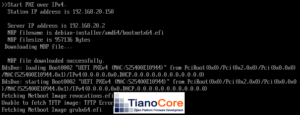
After creating these files, you should be able to boot your UEFI system using network PXE. The below screenshot shows a KVM virtual machine starting an installation.
Writing a provisioning script
It wouldn’t be one of my “old-school” sysadmin blog posts without including a Perl script, right? For this post, I wrote one that creates the Preseed and grub.cfg files for the system being provisioned, as well as providing an option to create a PXELinux configuration instead. This script assumes that the web server and TFTP server will run on the same host.
First, the necessary Perl modules can be install with: sudo apt install libtemplate-perl libconfig-tiny-perl, which install Template-Toolkit and Config::Tiny, respectively. Template-Toolkit creates files from template files, while Config::Tiny makes it easier to create configuration files. The configuration file for this script is named preseed_net_install.cfg. You could dispense with this step entirely and just put the parameters in the script itself; however, I prefer to use the same version of a script everywhere and put site-specific parameters in a configuration file.
apt_proxy=http://192.168.20.17:3142
dns=192.168.20.1
domain=ridpath.lab
http_dir=/home/matthew/nginx
network=192.168.20
pw_hash=password-hash-made-with-mkpasswd
Below are the templates used here. Your PXELinux one may differ from the one here. I could go into details on setting up PXELinux also, but I feel like that is somewhat out of the scope of this post (I discussed setting this up in my post on installing AlmaLinux 9 on a DL360 G7.)
#
# Preseed file for [% hostname %].[% domain %]
# MAC Address: [% mac %]
#
d-i debian-installer/locale string en_US
d-i keyboard-configuration/xkb-keymap select us
d-i netcfg/choose_interface select [% interface %]
d-i netcfg/disable_autoconfig boolean true
d-i netcfg/get_ipaddress string [% ip %]
d-i netcfg/get_netmask string [% netmask %]
d-i netcfg/get_gateway string [% gw %]
d-i netcfg/get_nameservers string [% dns %]
d-i netcfg/confirm_static boolean true
d-i netcfg/get_hostname string [% hostname %]
d-i netcfg/get_domain string [% domain %]
d-i netcfg/hostname string [% hostname %]
d-i netcfg/wireless_wep string
d-i hw-detect/load_firmware boolean false
d-i mirror/country string manual
d-i mirror/http/hostname string http.us.debian.org
d-i mirror/http/directory string /debian
d-i mirror/http/proxy string [% apt_proxy %]
d-i passwd/root-login boolean false
d-i passwd/make-user boolean true
d-i passwd/user-fullname string Ansible User
d-i passwd/username string ansible
d-i passwd/user-password-crypted password [% pw_hash %]
d-i clock-setup/utc boolean true
d-i time/zone string UTC
d-i clock-setup/ntp boolean true
d-i clock-setup/ntp-server string 0.pool.ntp.org
d-i partman-auto/init_automatically_partition select biggest_free
d-i partman-auto/method string regular
d-i partman-lvm/device_remove_lvm boolean true
d-i partman-md/device_remove_md boolean true
d-i partman-lvm/confirm boolean true
d-i partman-lvm/confirm_nooverwrite boolean true
d-i partman-auto/choose_recipe select atomic
d-i partman-partitioning/confirm_write_new_label boolean true
d-i partman/choose_partition select finish
d-i partman/confirm boolean true
d-i partman/confirm_nooverwrite boolean true
d-i partman-md/confirm boolean true
d-i partman-partitioning/confirm_write_new_label boolean true
d-i partman/choose_partition select finish
d-i partman/confirm boolean true
d-i partman/confirm_nooverwrite boolean true
d-i apt-setup/cdrom/set-first boolean false
tasksel tasksel/first multiselect standard, ssh-server
d-i pkgsel/include string sudo
popularity-contest popularity-contest/participate boolean false
d-i grub-installer/only_debian boolean true
d-i grub-installer/with_other_os boolean true
d-i grub-installer/bootdev string default
d-i finish-install/keep-consoles boolean true
d-i finish-install/reboot_in_progress note
set default="preseed"
set timeout=5
menuentry "Preseed installation" --id preseed {
     set background_color=black
     linux    /debian-installer/amd64/linux auto-install/enable=true netcfg/choose_interface=[% interface %] netcfg/disable_autoconfig=true netcfg/get_ipaddress=[% ip %] netcfg/get_netmask=[% netmask %] netcfg/get_gateway=[% gw %] netcfg/get_nameservers=[% dns %] netcfg/get_hostname=[% hostname %] netcfg/get_domain=[% domain %] netcfg/hostname=[% hostname %] preseed/url=http://[% http_ip %]/[% hostname %].cfg --- [% kernel_opts %]
     initrd   /debian-installer/amd64/initrd.gz
}
default menu.c32
prompt 0
ALLOWOPTIONS 0
NOESCAPE 1

timeout 50
ONTIMEOUT debian13

MENU TITLE BIOS PXE Menu

LABEL debian13
         MENU LABEL Debian 13 Installer
         KERNEL debian-installer/amd64/linux
         APPEND initrd=debian-installer/amd64/initrd.gz auto-install/enable=true netcfg/choose_interface=[% interface %] netcfg/disable_autoconfig=true netcfg/get_ipaddress=[% ip %] netcfg/get_netmask=[% netmask %] netcfg/get_gateway=[% gw %] netcfg/get_nameservers=[% dns %] netcfg/get_hostname=[% hostname %] netcfg/get_domain=[% domain %] netcfg/hostname=[% hostname %] preseed/url=http://[% http_ip %]/[% hostname %].cfg --- [% kernel_opts %]

LABEL local
        MENU LABEL Boot local hard drive
        LOCALBOOT 0
And finally, the Perl script itself:
#!/usr/bin/perl -w

use strict;
use Config::Tiny;
use Getopt::Long;
use Template;

my $delete;
GetOptions ('delete=s' => \$delete);

my $config_file = 'preseed_net_install.cfg';
my $config = Config::Tiny->read($config_file) || die "Unable to open $config_file\n";

# Read in parameters from preseed_net_install.cfg.
my $apt_proxy = $config->{_}->{apt_proxy} || '';
my $dns       = $config->{_}->{dns} || die "dns is undefined\n";
my $domain    = $config->{_}->{domain} || 'example.net';
my $http_dir  = $config->{_}->{http_dir} || '/var/www/html';
my $interface = $config->{_}->{default_interface} || 'auto';
my $network   = $config->{_}->{network} || die "network is undefined\n";
my $netmask   = $config->{_}->{netmask} || '255.255.255.0';
my $pw_hash   = $config->{_}->{pw_hash} || die "pw_hash is undefined\n";
my $tftp_dir  = $config->{_}->{tftp_dir} || '/srv/tftp';
# If gateway is undefined, it will be set to xxx.xxx.xxx.1
my $gateway   = $config->{_}->{gateway} || "${network}.1";

my $mac_address;

if ($delete) {
    my $preseed = "${http_dir}/${delete}.cfg";
    if (-f $preseed) {
        open(PRESEED, '<', $preseed);
        while (my $line = <PRESEED>) {
            if ($line =~ /^# MAC Address: ([a-z0-9\-]{17})/) {
                $mac_address = $1;
                last;
            }
        }
        close(PRESEED);
        print "Deleting preseed file for ${delete}.\n";
        unlink($preseed);
        if (-f "${tftp_dir}/debian-installer/amd64/grub/grub.cfg-01-${mac_address}") {
            print "Deleting grub.cfg file for ${delete}.\n";
            unlink("${tftp_dir}/debian-installer/amd64/grub/grub.cfg-01-${mac_address}")
        }
        if (-f "${tftp_dir}/pxelinux.cfg/01-${mac_address}") {
            print "Deleting pxelinux file for ${delete}.\n";
            unlink("${tftp_dir}/pxelinux.cfg/01-${mac_address}");
        }
    } else {
        print "A preseed file for $delete was not found. Exiting.\n";
    }
    exit;
}

# Obtain the default IP address of this system.
my($http_ip, $nic);
open(IPRT, '/usr/sbin/ip route show |') || die "ip route show failed!\n";
while (my $line = <IPRT>) {
    my @line_split = split(/\s+/, $line);
    if (($line_split[0] eq 'default') && !($nic)) {
        $nic = $line_split[4];
    }
    if ($line_split[2] eq $nic) {
        $http_ip = $line_split[8];
    }
}
close(IPRT);

print "This script will create the preseed and network boot files for a Debian installation.\n";
print 'Enter a name for the machine: ';
chomp(my $name = <STDIN>);
until ($name =~ /^[a-z0-9\-]{3,}$/) {
    print 'Name does not match regex. Please try again: ';
    chomp($name = <STDIN>);
}

print 'Enter an IP address for the machine: ';
chomp(my $ip = <STDIN>);
until ($ip =~ /^(\d{1,3}\.){3}\d{1,3}$/) {
    print 'IP address does not match regex. Please try again: ';
    chomp($ip = <STDIN>);
}
until (substr($ip, 0, length($network)) eq $network) {
    print "IP address $ip does not match network ${network}.\n";
    print 'Please try again: ';
    chomp($ip = <STDIN>);
}

print 'Enter a MAC address for the machine: ';
chomp($mac_address = <STDIN>);
until ($mac_address =~ /^([0-9a-f]{2}[:-]){5}([0-9a-f]{2})$/i) {
    print 'MAC address does not match regex. Please try again: ';
    chomp($mac_address = <STDIN>);
}
$mac_address =~ s/:/-/g;

print "Enter a provisioning type:\n";
print "1: PXELinux/BIOS\n";
print "2: GRUB2/UEFI\n";
print 'Enter a selection: ';
chomp(my $prov_type = <STDIN>);
until (grep {$_ == $prov_type} (1..2)) {
    print 'Invalid selection. Please try again: ';
    chomp($prov_type = <STDIN>);
}

print 'Optional - Enter additional kernel settings: ';
chomp(my $kernel_opts = <STDIN>);

my($net_template,$net_file);
if ($prov_type == 2) {
    $net_template = 'grub.cfg-01.tt';
    $net_file = "${tftp_dir}/debian-installer/amd64/grub/grub.cfg-01-${mac_address}";
} else {
    $net_template = "pxelinux.cfg-01.tt";
    $net_file = "${tftp_dir}/pxelinux.cfg/01-${mac_address}";
}

my $tt_vars = {
    apt_proxy   => $apt_proxy,
    dns         => $dns,
    domain      => $domain,
    gw          => $gateway,
    hostname    => $name,
    http_ip     => $http_ip,
    interface   => $interface,
    ip          => $ip,
    kernel_opts => $kernel_opts,
    mac         => $mac_address,
    netmask     => $netmask,
    pw_hash     => $pw_hash
};

my $p_tt = Template->new();
$p_tt->process('preseed.cfg.tt', $tt_vars, "${http_dir}/${name}.cfg") || die $p_tt->error;
my $net_tt = Template->new();
$net_tt->process($net_template, $tt_vars, $net_file) || die $net_tt->error;

print "Preseed and network boot files created for ${name}.${domain}.\n";
A few notes on the script:
- Run the script with -d short_hostname to delete a host. This can be done once Debian starts installing.
- The script assumes that the web server is running on the same host as the script. It obtains the IP address of host by running ip route.
- MAC addresses can either use colons or dashes. The script converts colons to dashes
- The parameter default_interface can set in the configuration file. This can be useful if you want the automated installation to choose a particular NIC.
I thought about trying to write this in another language such as Ruby, but I lost interest. Feel free to do so yourself!
Conclusion
It took me some time and a lot of troubleshooting to come up with a solution for replicating PXELinux behavior with GRUB2 and UEFI. There aren’t a lot of guides out there on getting this to work, with the most thorough one being for Enterprise Linux and not Debian. Thus, I hope that this is of use to someone, and that they can improve on what I’ve shared. For me, getting this to work was very helpful in building out a Proxmox VE cluster; it saved me the tedious hours of installing Debian manually on each server. As always, thanks for reading!