
Introduction
One of the many “hats” I wear in my job is an Oracle database administrator. In this role I write a number of Perl scripts that interact with the Oracle DB, and are used for purposes such as updating data and automating maintenance tasks. Over the years I’ve built up a fairly large library of scripts that I can clone off of when I need something new. With Perl and Oracle, one uses the DBI module for Oracle, DBD::Oracle. I’ve mostly used this on Red Hat systems—Enterprise Linux or EL, as I will refer to it here—distributed with an RPM package (instead of being installed using CPAN). Perhaps because it requires the installation of closed-source Oracle software, there aren’t pre-built RPMs of DBD::Oracle; I’ve always had to build these myself, using an RPM spec file I inherited from a colleague. However, I’ve wanted to revisit this and find a spec file from a source outside of work, one that I could use for experimentation in personal projects, as well as providing an improved version for my work. I was able to find a spec file from a public source, make some improvements, and build the packages for Enterprise Linux versions 7 through 10. This post documents those steps.
RPM Spec File
I was able to find a spec file for DBD::Oracle in the archived GitHub repository for the defunct Spacewalk project. It can be found here. I modified it somewhat for my own use, but give full credit to the people who originally authored it. I removed things unnecessary for my use, such as the change log. I only need to build the RPM for x86_64, so I removed parts that accommodate x86 or PowerPC. I gave it the ability to obtain the DBD::Oracle and Oracle Instant Client versions dynamically. The below code snippet contains the final product.
Summary: DBD-Oracle module for perl
Name: perl-DBD-Oracle
Version: %(ls -d ../SOURCES/DBD-Oracle-*.tar.gz | tail -1 | grep -oP '(\d+\.)+\d+')
Release: 1%{?dist}
License:  GPL+ or Artistic
Source0: https://cpan.metacpan.org/authors/id/Z/ZA/ZARQUON/DBD-Oracle-%{version}.tar.gz
Url: http://www.cpan.org
BuildRequires: perl >= 0:5.6.1, perl(DBI)
BuildRequires: perl(ExtUtils::MakeMaker)
BuildRequires: oracle-instantclient-devel
BuildRequires:  coreutils
BuildRequires:  findutils
BuildRequires:  make
BuildRequires:  perl
BuildRequires:  perl-generators
BuildRequires:  perl(strict)

Requires:  perl(:MODULE_COMPAT_%(eval "`%{__perl} -V:version`"; echo $version))
# the version requires is not automatically picked up
Requires: perl(DBI) >= 1.51

%description
DBD-Oracle module for perl

%prep
%define modname %(echo %{name}| sed 's/perl-//')
%define perl_vendorlib %(eval "`%{__perl} -V:installvendorlib`"; echo $installvendorlib)
%define perl_vendorarch %(eval "`%{__perl} -V:installvendorarch`"; echo $installvendorarch)

%setup -q -n %{modname}-%{version}

%build

MKFILE=$(find /usr/share/oracle/ -name demo.mk)
ORACLE_VER=$(rpm -q --queryformat='%%{VERSION}\n' oracle-instantclient-devel)
ORACLE_HOME=$(find /usr/lib/oracle/ -name client64 | tail -1)
export ORACLE_HOME
export LD_LIBRARY_PATH=$ORACLE_HOME/lib:$LD_LIBRARY_PATH
perl Makefile.PL -m $MKFILE INSTALLDIRS="vendor" PREFIX=%{_prefix} -V $ORACLE_VER
make %{?_smp_mflags} OPTIMIZE="%{optflags}"

%clean

%install
make PREFIX=$RPM_BUILD_ROOT%{_prefix} pure_install

rm -f `find $RPM_BUILD_ROOT -type f -name perllocal.pod -o -name .packlist`

%files
%{perl_vendorarch}/auto/DBD/
%{perl_vendorarch}/DBD/
%{_mandir}/man3/*

%changelog
Build environment
I used Docker containers to build these RPMs, because I prefer to build packages in a disposable environment. This is a personal preference; you can use a regular system if you prefer. You will need to install the Oracle Instant Client packages and a few other prerequisites. The Oracle Instant Client packages for EL version 7-10 can be obtained from Oracle using the links below. For each version, you will need the basic, devel, and sqlplus packages (the build will run without SQL Plus, but it complains about it).
- For EL7 and EL8 I used version 21, which can be downloaded from here and here, respectively.
- EL9 and EL10 I used version 23, which can be downloaded from here and here, respectively.
You can also add these Yum repositories to a .repo file that goes into /etc/yum.repos.d or gets copied into your Docker container. For example:
[instantclient]
name = Oracle Instant Client
baseurl = https://yum.oracle.com/repo/OracleLinux/OL$releasever/oracle/instantclient23/x86_64/
enabled = 1
gpgcheck = 0
Other than the image name, the Dockerfile is identical for each EL version. I chose AlmaLinux for my EL flavor, but Rocky Linux, Oracle Linux, etc. should work fine. Below is the Dockerfile:
FROM almalinux:10
LABEL org.opencontainers.image.authors="Matt Ridpath <matt@example.com>"
COPY instantclient.repo /etc/yum.repos.d/instantclient.repo
RUN yum install -y epel-release
RUN yum install -y gcc make oracle-instantclient-basic oracle-instantclient-devel oracle-instantclient-sqlplus perl perl-DBI perl-ExtUtils-MakeMaker perl-generators rpm-build
WORKDIR /root
RUN mkdir -p rpmbuild/{BUILD,RPMS,SOURCES,SPECS,SRPMS}
COPY perl-DBD-Oracle.spec rpmbuild/SPECS/perl-DBD-Oracle.spec
The build environment container can then be built with something like: docker build -t el9_perldbd . Again, all of the steps in the Dockerfile can be performed on a regular system.
Finally, you will need to download the tar.gz file for the DBD::Oracle version from here. Both EL8, 9, and 10 can use the latest version as of this writing, 1.95, but EL7 will need to use 1.90, because the DBI version in it is too old.
Build the RPM
When building with Docker, I first started up the container with the current directory containing the DBD-Oracle-ver.tar.gz file mounted into the container: docker run –rm -it -v ./:/temp matt/el8_perldbd bash. Copy the DBD-Oracle-ver.tar.gz to /root/rpmbuild/SOURCES (cp DBD-Oracle-1.95.tar.gz rpmbuild/SOURCES) and cd to rpmbuild/SPECS. Finally, build the RPM with the command rpmbuild -ba perl-DBD-Oracle.spec. If everything runs correctly, the RPMs will be written to /root/rpmbuild/RPMS/x86_64.
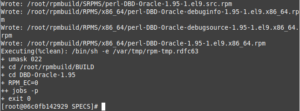
Copy the RPM(s) (you may not want the debug packages) back to /temp and exit from the container. The perl-DBD-Oracle RPM is now available for installation on your particular EL version. I’ve thought about putting all these steps into a Bash script, but the module rarely changes, so it isn’t worth it to me.
Testing it out with a simple Perl CGI page
I decided to try something a little different: instead of testing out the RPM with a basic command line script, I wrote a simple Perl CGI web page that queries some Oracle tables and outputs the results into an HTML table. I used the Template::Toolkit to render the HTML, Config::Tiny to store the configuration variables for accessing the Oracle Database, and of course the DBD::Oracle module. The CGI page is served using Apache running on a Enterprise Linux 10 Docker container in the standard configuration—all very 90s stuff. Yes, I realize CGI is insecure and has been deprecated; I’m not putting it out on the Internet or even on a corporate network. It is accessible only on my local isolated network. One day I would like to learn more about Perl web frameworks such as Dancer2. But for now, this is what I know; a bonus is that it can be adapted to work on vintage operating systems like Solaris.
First, you’ll need an Oracle server to try this out. I like 12c or 19c, as I’m still in the processing of understanding CDBs (I’m admittedly stuck in the 2010s). I won’t go into setting up one, as it is beyond the scope of this post. You will need a database with tables to query; I used the Inventory system database I created for my Solaris experimentation in a previous post. You will also need a tnsnames.ora file. Below is an example one:
MATTDB =
  (DESCRIPTION =
    (ADDRESS = (PROTOCOL = TCP)(HOST = oracle.example.net)(PORT = 1521))
    (CONNECT_DATA =
      (SERVER = DEDICATED)
      (SERVICE_NAME = mattdb.example.net)
    )
  )
Below is the schema I created for this. Like everything I create, it is a work in progress:
DROP USER inventory CASCADE;
CREATE USER inventory IDENTIFIED BY "abc1234";
GRANT connect, resource TO inventory;
ALTER USER inventory QUOTA 100M ON users;
CONNECT inventory/abc1234@mattdb;

SET AUTOCOMMIT ON;

CREATE SEQUENCE domains_seq;

CREATE TABLE domains (
    domain_id NUMBER,
    domain_name VARCHAR2(30) NOT NULL,
    PRIMARY KEY (domain_id),
    UNIQUE (domain_name)
);

CREATE OR REPLACE TRIGGER domains_on_insert
  BEFORE INSERT ON domains
  FOR EACH ROW
BEGIN
  SELECT domains_seq.nextval
  INTO :new.domain_id
  FROM dual;
END;
/

CREATE SEQUENCE locations_seq;

CREATE TABLE locations (
    location_id NUMBER,
    location_name VARCHAR2(50) NOT NULL,
    PRIMARY KEY (location_id),
    UNIQUE (location_name)
);

CREATE OR REPLACE TRIGGER locations_on_insert
  BEFORE INSERT ON locations
  FOR EACH ROW
BEGIN
  SELECT locations_seq.nextval
  INTO :new.location_id
  FROM dual;
END;
/

CREATE SEQUENCE hw_models_seq;

CREATE TABLE hw_models (
    hw_model_id NUMBER,
    hw_manufacturer VARCHAR2(30) NOT NULL,
    hw_model VARCHAR2(30) NOT NULL,
    PRIMARY KEY (hw_model_id),
    UNIQUE (hw_manufacturer,hw_model)
);

CREATE OR REPLACE TRIGGER hw_models_on_insert
  BEFORE INSERT ON hw_models
  FOR EACH ROW
BEGIN
  SELECT hw_models_seq.nextval
  INTO :new.hw_model_id
  FROM dual;
END;
/

CREATE SEQUENCE os_seq;

CREATE TABLE operating_systems (
    os_id NUMBER,
    os_vendor VARCHAR2(30) NOT NULL,
    os_name VARCHAR2(30) NOT NULL,
    os_version VARCHAR2(10) NOT NULL,
    PRIMARY KEY (os_id),
    UNIQUE (os_vendor,os_name,os_version)
);

CREATE OR REPLACE TRIGGER os_on_insert
  BEFORE INSERT ON operating_systems
  FOR EACH ROW
BEGIN
  SELECT os_seq.nextval
  INTO :new.os_id
  FROM dual;
END;
/

CREATE SEQUENCE inventory_seq START WITH 200000;

CREATE TABLE inventory (
    inventory_id NUMBER,
    name VARCHAR2(30) NOT NULL,
    serial_num VARCHAR2(30) NOT NULL,
    domain_id NUMBER NOT NULL,
    location_id NUMBER NOT NULL,
    hw_model_id NUMBER NOT NULL,
    os_id NUMBER NOT NULL,
    static_ip VARCHAR2(15),
    PRIMARY KEY (inventory_id),
    UNIQUE (name),
    UNIQUE (serial_num),
    FOREIGN KEY (domain_id) REFERENCES domains(domain_id),
    FOREIGN KEY (location_id) REFERENCES locations(location_id),
    FOREIGN KEY (hw_model_id) REFERENCES hw_models(hw_model_id),
    FOREIGN KEY (os_id) REFERENCES operating_systems(os_id)
);

CREATE OR REPLACE TRIGGER inventory_on_insert
  BEFORE INSERT ON inventory
  FOR EACH ROW
BEGIN
  SELECT inventory_seq.nextval
  INTO :new.inventory_id
  FROM dual;
END;
/

INSERT INTO domains (domain_name) VALUES ('dev.example.net');
INSERT INTO domains (domain_name) VALUES ('prod.example.net');
INSERT INTO domains (domain_name) VALUES ('ad.example.net');

INSERT INTO locations (location_name) VALUES ('New York Sales Office');
INSERT INTO locations (location_name) VALUES ('San Francisco Sales Office');
INSERT INTO locations (location_name) VALUES ('Raleigh, NC Office');
INSERT INTO locations (location_name) VALUES ('Atlanta Data Center');
INSERT INTO locations (location_name) VALUES ('Sacramento Data Center');

INSERT INTO hw_models (hw_manufacturer,hw_model) VALUES ('Sun Microsystems','V210');
INSERT INTO hw_models (hw_manufacturer,hw_model) VALUES ('Sun Microsystems','V240');
INSERT INTO hw_models (hw_manufacturer,hw_model) VALUES ('Sun Microsystems','X2100');
INSERT INTO hw_models (hw_manufacturer,hw_model) VALUES ('Sun Microsystems','SunBlade 100');
INSERT INTO hw_models (hw_manufacturer,hw_model) VALUES ('Sun Microsystems','SunBlade 150');
INSERT INTO hw_models (hw_manufacturer,hw_model) VALUES ('Sun Microsystems','Ultra 5');
INSERT INTO hw_models (hw_manufacturer,hw_model) VALUES ('Hewlett-Packard','Proliant DL360 G4');
INSERT INTO hw_models (hw_manufacturer,hw_model) VALUES ('Hewlett-Packard','Proliant DL360 G5');
INSERT INTO hw_models (hw_manufacturer,hw_model) VALUES ('Hewlett-Packard','Proliant DL360 G6');
INSERT INTO hw_models (hw_manufacturer,hw_model) VALUES ('Lenovo','Thinkpad T400');
INSERT INTO hw_models (hw_manufacturer,hw_model) VALUES ('Lenovo','Thinkpad T410');
INSERT INTO hw_models (hw_manufacturer,hw_model) VALUES ('Lenovo','Thinkpad T420');
INSERT INTO hw_models (hw_manufacturer,hw_model) VALUES ('Lenovo','Thinkpad X61');
INSERT INTO hw_models (hw_manufacturer,hw_model) VALUES ('Lenovo','Thinkpad X220');

INSERT INTO operating_systems (os_vendor,os_name,os_version) VALUES ('Sun Microsystems','Solaris','8');
INSERT INTO operating_systems (os_vendor,os_name,os_version) VALUES ('Sun Microsystems','Solaris','9');
INSERT INTO operating_systems (os_vendor,os_name,os_version) VALUES ('Sun Microsystems','Solaris','10');
INSERT INTO operating_systems (os_vendor,os_name,os_version) VALUES ('Red Hat','Red Hat Linux','6.2');
INSERT INTO operating_systems (os_vendor,os_name,os_version) VALUES ('Red Hat','RHEL','4.8');
INSERT INTO operating_systems (os_vendor,os_name,os_version) VALUES ('Red Hat','RHEL','5.4');
INSERT INTO operating_systems (os_vendor,os_name,os_version) VALUES ('Open Source','CentOS','4.8');
INSERT INTO operating_systems (os_vendor,os_name,os_version) VALUES ('Open Source','CentOS','5.6');
INSERT INTO operating_systems (os_vendor,os_name,os_version) VALUES ('Microsoft','Windows Server','2008R2');
INSERT INTO operating_systems (os_vendor,os_name,os_version) VALUES ('Microsoft','Windows','XP');
INSERT INTO operating_systems (os_vendor,os_name,os_version) VALUES ('Sun Microsystems','Solaris','2.6');

INSERT INTO inventory (name,domain_id,location_id,hw_model_id,os_id,static_ip,serial_num) VALUES ('jasmith-x61',3,1,13,10,NULL,'0RQ0VYOPSO');
INSERT INTO inventory (name,domain_id,location_id,hw_model_id,os_id,static_ip,serial_num) VALUES ('ddraper-x220',3,1,14,10,NULL,'UJBOLIP5IC');
INSERT INTO inventory (name,domain_id,location_id,hw_model_id,os_id,static_ip,serial_num) VALUES ('pmueller-sb100',1,3,4,2,'10.2.0.77','YMEVKDCVA2');
INSERT INTO inventory (name,domain_id,location_id,hw_model_id,os_id,static_ip,serial_num) VALUES ('pmueller-t420',3,3,12,10,NULL,'P1P7Z5WZZC');
INSERT INTO inventory (name,domain_id,location_id,hw_model_id,os_id,static_ip,serial_num) VALUES ('sac-prod-web-1',2,5,9,6,'10.0.0.5','KCJQI0GBT4');
INSERT INTO inventory (name,domain_id,location_id,hw_model_id,os_id,static_ip,serial_num) VALUES ('sac-prod-db-1',2,5,9,6,'10.0.0.15','22AZCLKDS9');
INSERT INTO inventory (name,domain_id,location_id,hw_model_id,os_id,static_ip,serial_num) VALUES ('sac-prod-fs-1',2,5,2,3,'10.0.0.22','WH52HKBUJ0');
INSERT INTO inventory (name,domain_id,location_id,hw_model_id,os_id,static_ip,serial_num) VALUES ('atl-dev-web-1',1,4,7,8,'10.10.0.50','SUVJ2H44GY');
INSERT INTO inventory (name,domain_id,location_id,hw_model_id,os_id,static_ip,serial_num) VALUES ('atl-dev-ldap-1',1,4,7,7,'10.10.0.52','02187Z7HTN');
INSERT INTO inventory (name,domain_id,location_id,hw_model_id,os_id,static_ip,serial_num) VALUES ('atl-dev-db-1',1,4,7,8,'10.10.0.54','RDH3MOM9KP');

CREATE TABLE recycling_bin (
    inventory_id NUMBER,
    name VARCHAR2(30) NOT NULL,
    serial_num VARCHAR2(30) NOT NULL,
    domain_id NUMBER NOT NULL,
    location_id NUMBER NOT NULL,
    hw_model_id NUMBER NOT NULL,
    os_id NUMBER NOT NULL,
    static_ip VARCHAR2(15),
    delete_ts DATE,
    PRIMARY KEY (inventory_id),
    UNIQUE (name),
    UNIQUE (serial_num)
);

CREATE OR REPLACE TRIGGER inventory_on_delete
  BEFORE DELETE ON inventory
  FOR EACH ROW
BEGIN
  INSERT INTO recycling_bin
  (inventory_id,
    name,
    serial_num,
    domain_id,
    location_id,
    hw_model_id,
    os_id,
    static_ip,
    delete_ts
   )
  values(:old.inventory_id,
            :old.name,
            :old.serial_num,
            :old.domain_id,
            :old.location_id,
            :old.hw_model_id,
            :old.os_id,
            :old.static_ip,
            SYSDATE);
END;
/

SET AUTOCOMMIT OFF;
The CGI script uses a configuration file, inventory.cfg, to store values for the database name, user/schema, and password.
db_name=mattdb
db_user=inventory
db_pass=abc1234
I created a Dockerfile to build an image with all of the packages required for running the script. The configuration files are also copied in.
FROM almalinux:10
LABEL org.opencontainers.image.authors="Matt Ridpath <matt@example.com>"
COPY instantclient.repo /etc/yum.repos.d/instantclient.repo
RUN yum install -y epel-release
RUN yum install -y httpd oracle-instantclient-basic oracle-instantclient-devel oracle-instantclient-sqlplus perl perl-DBI perl-DBD-Oracle perl-CGI perl-Template-Toolkit perl-Config-Tiny
COPY tnsnames.ora /etc/tnsnames.ora
COPY inventory.cfg /usr/local/etc/inventory.cfg
EXPOSE 80
CMD ["httpd", "-D", "FOREGROUND"]
I then built the image with something like: docker build -t matt/perldbd_httpd . After this, I created a directory for my CGI scripts in the current working directory, cgi-bin, and started up the Docker container with this directory mounted in: docker run -d -v $PWD/cgi-bin:/var/www/cgi-bin -p 8080:80 –name oracle_cgi matt/perldbd_httpd. No, I did not configure HTTPS; this is supposed to be like 1999, after all.
For this test, I put the HTML into a Template::Toolkit file, inventory_report.tt. This isn’t necessary, as your can put all of the HTML directly in the script, but using templates has been the standard practice for a while. Like everything else in this script, the template is basic. Note: the parameter names needed to be upper-cased, as that’s how Oracle returns them.
<!DOCTYPE html>
<html>
<head>
  <title>Inventory Report</title>
  <style>
  table, th, td {
    border: 1px solid black;
  }
  th, td {
    padding: 5px;
  }
  </style>
</head>
<body>
<h1>Inventory Report as of [% date %]</h1>
<br/>
<table>
  <tr>
    <th>Asset Tag</th>
    <th>Name</th>
    <th>Domain</th>
    <th>Location</th>
    <th>HW Model</th>
    <th>OS</th>
    <th>IP</th>
  </tr>
[% FOREACH row IN rows -%]
  <tr>
    <td>[% row.key %]</td>
    <td>[% row.value.NAME %]</td>
    <td>[% row.value.DOMAIN_NAME %]</td>
    <td>[% row.value.LOCATION_NAME %]</td>
    <td>[% row.value.HW_MODEL %]</td>
    <td>[% row.value.OS %]</td>
    <td>[% row.value.IP %]</td>
  </tr>
[% END -%]
</table>
</body>
</html>
And finally, the CGI script itself.
#!/usr/bin/perl -w

use strict;
use DBI;
use Config::Tiny;
use CGI;
use POSIX qw(strftime);
use Template;

my $Config = Config::Tiny->new();
$Config = Config::Tiny->read('/usr/local/etc/inventory.cfg') || die "Unable to read inventory.cfg\n";

my $dbh = DBI->connect('dbi:Oracle:' . $Config->{_}->{db_name}, $Config->{_}->{db_user}, $Config->{_}->{db_pass}) || die( $DBI::errstr . "\n" );

my $date = strftime('%B %m, %Y', localtime);
my $cgi = CGI->new;
print $cgi->header('text/html');

my $sql = <<'SQL';
SELECT i.INVENTORY_ID, i.NAME, d.DOMAIN_NAME, l.LOCATION_NAME,
h.HW_MANUFACTURER || ' ' || h.HW_MODEL AS HW_MODEL,
o.OS_VENDOR || ' ' || o.OS_NAME || ' ' || o.OS_VERSION AS OS,
NVL(i.STATIC_IP,'DHCP') AS IP
FROM inventory i
INNER JOIN domains d USING(domain_ID)
INNER JOIN locations l USING(location_id)
INNER JOIN hw_models h USING(hw_model_id)
INNER JOIN operating_systems o USING(os_id)
ORDER BY i.inventory_id
SQL

my $sth = $dbh->prepare($sql) || die "Can't prepare statement: $DBI::errstr";
$sth->execute || die "Can't execute statement: $DBI::errstr";
my $rows = $sth->fetchall_hashref('INVENTORY_ID');
$sth->finish();
$dbh->disconnect;

my $tt_vars = {
    date => $date,
    rows => $rows
};
my $tt = Template->new();
$tt->process('inventory_report.tt', $tt_vars) || die $tt->error;
Make sure to make it executable of course! (chmod +x inventory_report.pl) It should now be available at http://127.0.0.1:8080/cgi-bin/inventory_report.pl.
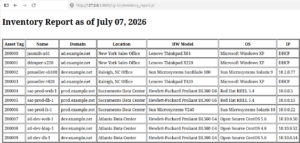
And that’s all there is to it—really boring stuff. I really want to get a little better at web development, and at least write some simple pages for reading and managing data in Oracle. At some point I’ll find more time to come up with some better stuff. However, I hope that the information on building the RPMs is of use to someone who needs to do the same thing. As always, thanks for reading!