
Introduction
In my last post, I discussed building RPM packages for the Perl Oracle DB driver for Enterprise Linux. These packages were then used to build a Docker container running Apache and an Oracle client, which could be used to serve Perl CGI scripts. In this post I discuss installing this same module, but in a Debian-based Apache/HTTPD container, which is more lightweight and better-suited to running Apache than a full OS container. For me, this was a quick way to get a 90s-style Apache CGI environment up and running in order to start learning how to do some basic web development for systems administration (full disclosure: I am not a web developer).
Obtain the Oracle Instant Client
For this exercise, you will need the Oracle Instant Client for accessing an Oracle database. It is available for free and can be obtained here. I downloaded the latest version as of this writing, 23.26.3.0.0. You will need the ZIP files of the Basic Package, SQL*Plus Package, and the SDK Package. I unzipped the files with the unzip command into my project directory, where they uncompressed into the instantclient_23_26 directory. Later, this directory will be copied into the Docker image.
If you’re reading this, you probably have an Oracle DB server or know how to set one up. In the past I’ve been able to download evaluation copies for Oracle DB from Oracle, though you do have to register for an account. 12c tends to be my go-to version, since I can set it up more quickly than later versions, even though it’s 13 years old at this point. Any version after 9i should work, as Oracle is very backward and forward compatible. For example, in the past I’ve followed this guide from www.server-world.info. In addition to an Oracle server, you will need a database with tables to query; I used the Inventory system database I created for my Solaris experimentation in a previous post. You will also need a tnsnames.ora file. Below is an example one:
MATTDB =
  (DESCRIPTION =
    (ADDRESS = (PROTOCOL = TCP)(HOST = oracle.example.net)(PORT = 1521))
    (CONNECT_DATA =
      (SERVER = DEDICATED)
      (SERVICE_NAME = mattdb.example.net)
    )
  )
Below is the schema I created for this. Like everything I create, it is a work in progress:
DROP USER inventory CASCADE;
CREATE USER inventory IDENTIFIED BY "abc1234";
GRANT connect, resource TO inventory;
ALTER USER inventory QUOTA 100M ON users;
CONNECT inventory/abc1234@mattdb;

SET AUTOCOMMIT ON;

CREATE SEQUENCE domains_seq;

CREATE TABLE domains (
    domain_id NUMBER,
    domain_name VARCHAR2(30) NOT NULL,
    PRIMARY KEY (domain_id),
    UNIQUE (domain_name)
);

CREATE OR REPLACE TRIGGER domains_on_insert
  BEFORE INSERT ON domains
  FOR EACH ROW
BEGIN
  SELECT domains_seq.nextval
  INTO :new.domain_id
  FROM dual;
END;
/

CREATE SEQUENCE locations_seq;

CREATE TABLE locations (
    location_id NUMBER,
    location_name VARCHAR2(50) NOT NULL,
    PRIMARY KEY (location_id),
    UNIQUE (location_name)
);

CREATE OR REPLACE TRIGGER locations_on_insert
  BEFORE INSERT ON locations
  FOR EACH ROW
BEGIN
  SELECT locations_seq.nextval
  INTO :new.location_id
  FROM dual;
END;
/

CREATE SEQUENCE hw_models_seq;

CREATE TABLE hw_models (
    hw_model_id NUMBER,
    hw_manufacturer VARCHAR2(30) NOT NULL,
    hw_model VARCHAR2(30) NOT NULL,
    PRIMARY KEY (hw_model_id),
    UNIQUE (hw_manufacturer,hw_model)
);

CREATE OR REPLACE TRIGGER hw_models_on_insert
  BEFORE INSERT ON hw_models
  FOR EACH ROW
BEGIN
  SELECT hw_models_seq.nextval
  INTO :new.hw_model_id
  FROM dual;
END;
/

CREATE SEQUENCE os_seq;

CREATE TABLE operating_systems (
    os_id NUMBER,
    os_vendor VARCHAR2(30) NOT NULL,
    os_name VARCHAR2(30) NOT NULL,
    os_version VARCHAR2(10) NOT NULL,
    PRIMARY KEY (os_id),
    UNIQUE (os_vendor,os_name,os_version)
);

CREATE OR REPLACE TRIGGER os_on_insert
  BEFORE INSERT ON operating_systems
  FOR EACH ROW
BEGIN
  SELECT os_seq.nextval
  INTO :new.os_id
  FROM dual;
END;
/

CREATE SEQUENCE inventory_seq START WITH 200000;

CREATE TABLE inventory (
    inventory_id NUMBER,
    name VARCHAR2(30) NOT NULL,
    serial_num VARCHAR2(30) NOT NULL,
    domain_id NUMBER NOT NULL,
    location_id NUMBER NOT NULL,
    hw_model_id NUMBER NOT NULL,
    os_id NUMBER NOT NULL,
    static_ip VARCHAR2(15),
    PRIMARY KEY (inventory_id),
    UNIQUE (name),
    UNIQUE (serial_num),
    FOREIGN KEY (domain_id) REFERENCES domains(domain_id),
    FOREIGN KEY (location_id) REFERENCES locations(location_id),
    FOREIGN KEY (hw_model_id) REFERENCES hw_models(hw_model_id),
    FOREIGN KEY (os_id) REFERENCES operating_systems(os_id)
);

CREATE OR REPLACE TRIGGER inventory_on_insert
  BEFORE INSERT ON inventory
  FOR EACH ROW
BEGIN
  SELECT inventory_seq.nextval
  INTO :new.inventory_id
  FROM dual;
END;
/

INSERT INTO domains (domain_name) VALUES ('dev.example.net');
INSERT INTO domains (domain_name) VALUES ('prod.example.net');
INSERT INTO domains (domain_name) VALUES ('ad.example.net');

INSERT INTO locations (location_name) VALUES ('New York Sales Office');
INSERT INTO locations (location_name) VALUES ('San Francisco Sales Office');
INSERT INTO locations (location_name) VALUES ('Raleigh, NC Office');
INSERT INTO locations (location_name) VALUES ('Atlanta Data Center');
INSERT INTO locations (location_name) VALUES ('Sacramento Data Center');

INSERT INTO hw_models (hw_manufacturer,hw_model) VALUES ('Sun Microsystems','V210');
INSERT INTO hw_models (hw_manufacturer,hw_model) VALUES ('Sun Microsystems','V240');
INSERT INTO hw_models (hw_manufacturer,hw_model) VALUES ('Sun Microsystems','X2100');
INSERT INTO hw_models (hw_manufacturer,hw_model) VALUES ('Sun Microsystems','SunBlade 100');
INSERT INTO hw_models (hw_manufacturer,hw_model) VALUES ('Sun Microsystems','SunBlade 150');
INSERT INTO hw_models (hw_manufacturer,hw_model) VALUES ('Sun Microsystems','Ultra 5');
INSERT INTO hw_models (hw_manufacturer,hw_model) VALUES ('Hewlett-Packard','Proliant DL360 G4');
INSERT INTO hw_models (hw_manufacturer,hw_model) VALUES ('Hewlett-Packard','Proliant DL360 G5');
INSERT INTO hw_models (hw_manufacturer,hw_model) VALUES ('Hewlett-Packard','Proliant DL360 G6');
INSERT INTO hw_models (hw_manufacturer,hw_model) VALUES ('Lenovo','Thinkpad T400');
INSERT INTO hw_models (hw_manufacturer,hw_model) VALUES ('Lenovo','Thinkpad T410');
INSERT INTO hw_models (hw_manufacturer,hw_model) VALUES ('Lenovo','Thinkpad T420');
INSERT INTO hw_models (hw_manufacturer,hw_model) VALUES ('Lenovo','Thinkpad X61');
INSERT INTO hw_models (hw_manufacturer,hw_model) VALUES ('Lenovo','Thinkpad X220');

INSERT INTO operating_systems (os_vendor,os_name,os_version) VALUES ('Sun Microsystems','Solaris','8');
INSERT INTO operating_systems (os_vendor,os_name,os_version) VALUES ('Sun Microsystems','Solaris','9');
INSERT INTO operating_systems (os_vendor,os_name,os_version) VALUES ('Sun Microsystems','Solaris','10');
INSERT INTO operating_systems (os_vendor,os_name,os_version) VALUES ('Red Hat','Red Hat Linux','6.2');
INSERT INTO operating_systems (os_vendor,os_name,os_version) VALUES ('Red Hat','RHEL','4.8');
INSERT INTO operating_systems (os_vendor,os_name,os_version) VALUES ('Red Hat','RHEL','5.4');
INSERT INTO operating_systems (os_vendor,os_name,os_version) VALUES ('Open Source','CentOS','4.8');
INSERT INTO operating_systems (os_vendor,os_name,os_version) VALUES ('Open Source','CentOS','5.6');
INSERT INTO operating_systems (os_vendor,os_name,os_version) VALUES ('Microsoft','Windows Server','2008R2');
INSERT INTO operating_systems (os_vendor,os_name,os_version) VALUES ('Microsoft','Windows','XP');
INSERT INTO operating_systems (os_vendor,os_name,os_version) VALUES ('Sun Microsystems','Solaris','2.6');

INSERT INTO inventory (name,domain_id,location_id,hw_model_id,os_id,static_ip,serial_num) VALUES ('jasmith-x61',3,1,13,10,NULL,'0RQ0VYOPSO');
INSERT INTO inventory (name,domain_id,location_id,hw_model_id,os_id,static_ip,serial_num) VALUES ('ddraper-x220',3,1,14,10,NULL,'UJBOLIP5IC');
INSERT INTO inventory (name,domain_id,location_id,hw_model_id,os_id,static_ip,serial_num) VALUES ('pmueller-sb100',1,3,4,2,'10.2.0.77','YMEVKDCVA2');
INSERT INTO inventory (name,domain_id,location_id,hw_model_id,os_id,static_ip,serial_num) VALUES ('pmueller-t420',3,3,12,10,NULL,'P1P7Z5WZZC');
INSERT INTO inventory (name,domain_id,location_id,hw_model_id,os_id,static_ip,serial_num) VALUES ('sac-prod-web-1',2,5,9,6,'10.0.0.5','KCJQI0GBT4');
INSERT INTO inventory (name,domain_id,location_id,hw_model_id,os_id,static_ip,serial_num) VALUES ('sac-prod-db-1',2,5,9,6,'10.0.0.15','22AZCLKDS9');
INSERT INTO inventory (name,domain_id,location_id,hw_model_id,os_id,static_ip,serial_num) VALUES ('sac-prod-fs-1',2,5,2,3,'10.0.0.22','WH52HKBUJ0');
INSERT INTO inventory (name,domain_id,location_id,hw_model_id,os_id,static_ip,serial_num) VALUES ('atl-dev-web-1',1,4,7,8,'10.10.0.50','SUVJ2H44GY');
INSERT INTO inventory (name,domain_id,location_id,hw_model_id,os_id,static_ip,serial_num) VALUES ('atl-dev-ldap-1',1,4,7,7,'10.10.0.52','02187Z7HTN');
INSERT INTO inventory (name,domain_id,location_id,hw_model_id,os_id,static_ip,serial_num) VALUES ('atl-dev-db-1',1,4,7,8,'10.10.0.54','RDH3MOM9KP');

CREATE TABLE recycling_bin (
    inventory_id NUMBER,
    name VARCHAR2(30) NOT NULL,
    serial_num VARCHAR2(30) NOT NULL,
    domain_id NUMBER NOT NULL,
    location_id NUMBER NOT NULL,
    hw_model_id NUMBER NOT NULL,
    os_id NUMBER NOT NULL,
    static_ip VARCHAR2(15),
    delete_ts DATE,
    PRIMARY KEY (inventory_id),
    UNIQUE (name),
    UNIQUE (serial_num)
);

CREATE OR REPLACE TRIGGER inventory_on_delete
  BEFORE DELETE ON inventory
  FOR EACH ROW
BEGIN
  INSERT INTO recycling_bin
  (inventory_id,
    name,
    serial_num,
    domain_id,
    location_id,
    hw_model_id,
    os_id,
    static_ip,
    delete_ts
   )
  values(:old.inventory_id,
            :old.name,
            :old.serial_num,
            :old.domain_id,
            :old.location_id,
            :old.hw_model_id,
            :old.os_id,
            :old.static_ip,
            SYSDATE);
END;
/

SET AUTOCOMMIT OFF;
Building the Docker image
In order to run CGI scripts in an httpd Docker container, you must first modify the default httpd.conf in the container. To modify this, first copy it into your project directory with: docker run –rm httpd:2.4 cat /usr/local/apache2/conf/httpd.conf > httpd.conf. Edit httpd.conf and uncomment out the below line:
LoadModule cgid_module modules/mod_cgid.so
The httpd.conf will then be copied back into the custom Docker image during the build process.
Finally, the Dockerfile itself, which is used to build the custom image with Perl DBD::Oracle. It took a fair amount of trial and error to get this image to build. For example, I had to perform hacks such as symlinking /usr/lib/x86_64-linux-gnu/libaio.so.1t64 to /usr/lib/x86_64-linux-gnu/libaio.so.1. Admittedly, it took less work to accomplish this same task in Enterprise Linux. Below is the Dockerfile:
FROM httpd:2.4-trixie
LABEL org.opencontainers.image.authors="Matt Ridpath <matt@example.com>"
RUN mkdir -p /usr/share/oracle/client64
COPY instantclient_23_26/ /usr/share/oracle/client64/
RUN echo "/usr/share/oracle/client64" > /etc/ld.so.conf.d/oracle-instantclient.conf
RUN ldconfig
ENV ORACLE_HOME="/usr/share/oracle/client64"
RUN apt-get update && apt-get install -y gcc libaio1t64 libcgi-pm-perl libconfig-tiny-perl libdbi-perl libtemplate-perl make
RUN ln -s /usr/lib/x86_64-linux-gnu/libaio.so.1t64 /usr/lib/x86_64-linux-gnu/libaio.so.1
RUN perl -MCPAN -e 'install DBD::Oracle'
COPY tnsnames.ora /etc/tnsnames.ora
COPY httpd.conf /usr/local/apache2/conf/httpd.conf
If you’re running into trouble getting the CPAN installation to work, I recommend building the container without that step, then running perl -MCPAN -e ‘install DBD::Oracle’ in a container Bash session with all of the prerequisites installed. This was how I was able to work through all of the issues (example: sudo docker run -it –rm oracle_cgi bash).
Running a CGI App that connects to Oracle
Within the project directory, I created a cgi-bin directory to store my CGI scripts and a conf directory to configuration files for the applications. These directories then get mounted into the container with a command similar to below:
sudo docker run -d -v $PWD/cgi-bin:/usr/local/apache2/cgi-bin -v $PWD/conf:/usr/local/etc -p 8080:80 --name oracle_cgi matt/perldbd_httpd
In the conf directory, I create a configuration file for my inventory system, inventory.cfg, to store values for the database name, user/schema, and password. You should never commit this file to Git.
db_name=mattdb
db_user=inventory
db_pass=abc1234
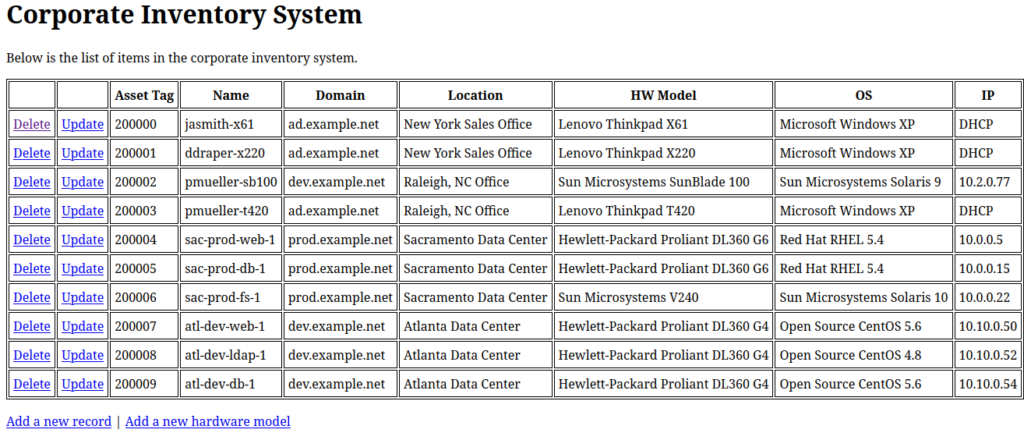
Within the cgi-bin directory, I created a simple page that displays records from my inventory system database in an HTML table, with links to pages where the records can be updated or deleted. It is an ugly page, but again, I’m not a front end developer. The page is rendered using the Template Toolkit. Below are the code snippets for the script, template, and module file:
#!/usr/bin/perl -w

use strict;
use CGI;
use lib qw(.);
use InventoryCGI qw(conn_db parse_tt inventory_all_rows);

my $cgi = CGI->new;
print $cgi->header('text/html');

my $dbh = &conn_db;
my $rows = &inventory_all_rows($dbh);

my $tt_vars = {rows => $rows};
&parse_tt('inventory_list.tt', $tt_vars);
$dbh->disconnect;
<!DOCTYPE html>
<html>
<head>
  <title>Corporate Inventory System</title>
  <style>
  table, th, td {
    border: 1px solid black;
  }
  th, td {
    padding: 5px;
  }
  </style>
</head>
<body>
<h1>Corporate Inventory System</h1>
<p>
Below is the list of items in the corporate inventory system.
</p>
<table>
  <tr>
    <th></th>
    <th></th>
    <th>Asset Tag</th>
    <th>Name</th>
    <th>Domain</th>
    <th>Location</th>
    <th>HW Model</th>
    <th>OS</th>
    <th>IP</th>
  </tr>
[% FOREACH row IN rows -%]
  <tr>
    <td><a href="delete_rec.cgi?id=[% row.key %]">Delete</a></td>
    <td><a href="update_rec.cgi?id=[% row.key %]">Update</a></td>
    <td>[% row.key %]</td>
    <td>[% row.value.NAME %]</td>
    <td>[% row.value.DOMAIN_NAME %]</td>
    <td>[% row.value.LOCATION_NAME %]</td>
    <td>[% row.value.HW_MODEL %]</td>
    <td>[% row.value.OS %]</td>
    <td>[% row.value.IP %]</td>
  </tr>
[% END -%]
</table>
<p><a href="add_record.cgi">Add a new record</a> | <a href="add_new_hw_model.cgi">Add a new hardware model</a></p>
</body>
</html>
use strict;
use warnings;
use Template;
use Config::Tiny;
use DBI;

package InventoryCGI;
require Exporter;

our @ISA = qw(Exporter);
our @EXPORT = qw(conn_db parse_tt);
our @EXPORT_OK = qw(inventory_all_rows get_inventory_rec select_all_rows select_row_by_id);

sub get_config {
    my $Config = Config::Tiny->new();
    $Config = Config::Tiny->read('/usr/local/etc/inventory.cfg') || die "Unable to read inventory.cfg\n";
    return (
        $Config->{_}->{db_name},
        $Config->{_}->{db_user},
        $Config->{_}->{db_pass}
    );
}

sub conn_db {
    my $driver = 'Oracle';
    my($db, $user, $pw) = &get_config;
    my $dbh = DBI->connect("dbi:${driver}:${db}", $user, $pw, { AutoCommit => 0 , RaiseError => 1}) || die( $DBI::errstr . "\n" );
    return $dbh;
}

sub get_inventory_rec {
    my $dbh = $_[0];
    my $val = $_[1];
    my $col = $_[2] || 'INVENTORY_ID';
    my $sql = <<~"SQL";
        SELECT i.INVENTORY_ID, i.NAME, DOMAIN_ID, LOCATION_ID,
        HW_MODEL_ID, OS_ID, NVL(i.STATIC_IP,'DHCP') AS IP,
        d.DOMAIN_NAME, l.LOCATION_NAME, i.SERIAL_NUM,
        h.HW_MANUFACTURER || ' ' || h.HW_MODEL AS HW_MODEL,
        o.OS_VENDOR || ' ' || o.OS_NAME || ' ' || o.OS_VERSION AS OS
        FROM inventory i
        INNER JOIN domains d USING(domain_id)
        INNER JOIN locations l USING(location_id)
        INNER JOIN hw_models h USING(hw_model_id)
        INNER JOIN operating_systems o USING(os_id)
        WHERE i.${col} = '${val}'
    SQL

    my $hash_ref = $dbh->selectrow_hashref($sql);
    return $hash_ref;
}

sub inventory_all_rows {
    my $dbh = $_[0];
    my $sql = <<~"SQL";
        SELECT i.INVENTORY_ID, i.NAME, d.DOMAIN_NAME, l.LOCATION_NAME,
        h.HW_MANUFACTURER || ' ' || h.HW_MODEL AS HW_MODEL,
        o.OS_VENDOR || ' ' || o.OS_NAME || ' ' || o.OS_VERSION AS OS,
        NVL(i.STATIC_IP,'DHCP') AS IP
        FROM inventory i
        INNER JOIN domains d USING(domain_ID)
        INNER JOIN locations l USING(location_id)
        INNER JOIN hw_models h USING(hw_model_id)
        INNER JOIN operating_systems o USING(os_id)
    SQL

    my $hash_ref = $dbh->selectall_hashref($sql, 'INVENTORY_ID');
    return $hash_ref;
}

sub select_all_rows {
    my $dbh    = $_[0];
    my $table  = $_[1];
    my $id_col = $_[2] || substr($table, 0, -1) . '_ID';
    my $sql    = "SELECT * FROM $table";

    my $hash_ref = $dbh->selectall_hashref($sql, $id_col);
    return $hash_ref;
}

sub select_row_by_id {
    my $dbh    = $_[0];
    my $table  = $_[1];
    my $id     = $_[2];
    my $id_col = $_[3] || substr($table, 0, -1) . '_ID';
    my $sql    = "SELECT * FROM $table WHERE $id_col = $id";

    my $hash_ref = $dbh->selectrow_hashref($sql);
    return $hash_ref;
}

sub parse_tt {
    my($template, $vars) = @_;
    die "Template file $template not found!\n" unless (-f $template);

    my $tt = Template->new();
    $tt->process($template, $vars) || die $tt->error;
}
Some of the subroutines in the module are used in other scripts which I haven’t shared here. As I’ve mentioned previously, none of this code is meant for production use and is for experimental/tested purposes only.
Creating a Perl DBD::Oracle container without Apache
The steps for creating a Docker container without Apache are similar, except that the debian:13 image is used instead of the httpd one. This container can then be used to run Perl scripts that aren’t served on the web.
FROM debian:13
LABEL org.opencontainers.image.authors="Matt Ridpath <matt@example.com>"
RUN mkdir -p /usr/share/oracle/client64
COPY instantclient_23_26/ /usr/share/oracle/client64/
RUN echo "/usr/share/oracle/client64" > /etc/ld.so.conf.d/oracle-instantclient.conf
RUN ldconfig
ENV ORACLE_HOME="/usr/share/oracle/client64"
RUN apt-get update && apt-get install -y gcc libaio1t64 libdbi-perl make
RUN ln -s /usr/lib/x86_64-linux-gnu/libaio.so.1t64 /usr/lib/x86_64-linux-gnu/libaio.so.1
RUN perl -MCPAN -e 'install DBD::Oracle'
COPY tnsnames.ora /etc/tnsnames.ora
Conclusion
I don’t expect this post to be of interest to anyone; not many people are writing Perl CGI scripts these days. In any case, thanks for reading!