
In a past post, I discussed installing Oracle 8i on Solaris 2.6 inside the QEMU SPARC32 CPU architecture emulator. This worked well, but due to the need for the host machine to emulate another CPU architecture, even an “antique” one, the CPU demands are high. A more efficient way to experiment with Solaris on a virtual machine is to install the x86 version on VirtualBox, which is the only hypervisor I’ve been able to get it to run on. Recently I downloaded an ISO of Solaris 8 x86 and decided to install it on a VirtualBox VM, while also installing Oracle 8i Enterprise Edition. I also patch Solaris 8 in this post and install OpenSSH. Finally, I included a brief section on getting Solaris 7 up and running with Oracle 8i.
Solaris 8 Installation
For installing Solaris 8 on VirtualBox, I’ve always followed the guide here: https://github.com/mac-65/Solaris_8_x86_VM. The version of VirtualBox in that guide is older than the one I use, 7.2 on Debian Bookworm, so I included screenshots of my configuration.
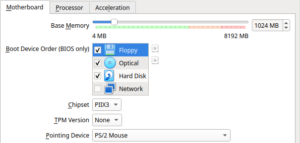
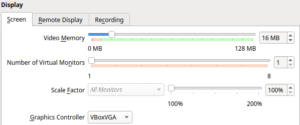
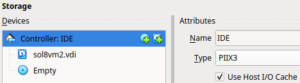
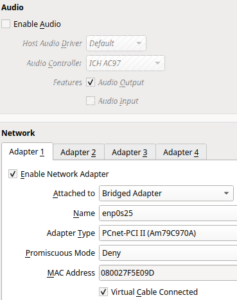
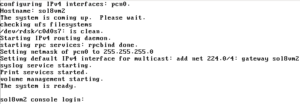
After completing the installation, I logged into the graphical interface once, opened the terminal, and disabled the GUI with the command /usr/dt/bin/dtconfig -d, as it is practically unusable. You must reboot for these changes to take effect.
Installing Solaris patches
Next, I installed the following patches for Solaris 8:
- The Solaris 8 x86 recommended patch cluster, found here.
- Patch 112439-02, which provides /dev/random and /dev/urandom (needed to generate SSH keys), found here.
- Patch 112757-01, which is also required for installing OpenSSH, found here.
Once again, thank you to this site for continuing to host these patches! To copy the patches to my Solaris VM, I found the best method is to mount an NFS share and copy them to /tmp. curl and wget aren’t installed, so you can’t just host those files out on a web server. I also tried using the installed FTP client and hosting the files with VSFTPD, but the FTP client seemed to crash the virtual NIC for some reason. NFS ended up being the being the best method. The share needs to allow NFS version 3 also.
First, log in as root at the console. I recommend using the Bash shell by entering bash at the prompt instead of the default Bourne shell, to save some aggravation. Below are the commands I ran to stage the patches:
mount 192.168.1.1:/software /mnt
cp 8_x86_Recommended.zip 112439-02.zip 112757-01.zip
cd /tmp
unzip 8_x86_Recommended.zip
unzip 112439-02.zip
unzip 112757-01.zip
cd to 8_x86_Recommended and run ./install_cluster. It will take some time. Then install the additional patches with: patchadd -d /tmp/112439-02 and patchadd -d /tmp/112757-01. I recommend shutting down the VM and taking a snapshot after installing the patches.
Installing OpenSSH
Solaris 8 did not come with OpenSSH; this was added in Solaris 9. For accessing a system remotely, you had to access it with the unencrypted RSH (remote shell). I’ve always preferred to install OpenSSH, as mostly of my computers have the client for it installed, whereas finding a client for RSH is getting increasingly difficult (it has been removed from Debian, for example). Installing OpenSSH will also provide the capability for X11 forwarding, which is needed for installing Oracle remotely. In a previous post I discussed the steps for installing OpenSSH on Solaris 8 in more detail, but will describe the steps again here. OpenSSH is installed from the OpenCSW Solaris package archive.
- Download the pkgutil package from OpenCSW and save it to your NFS share. It can be found here.
- Mount up the NFS share again. For example, mount 192.168.1.1:/software /mnt.
- cd to /mnt and install the pkgutil package: pkgadd -d pkgutil.pkg
- After the package is installed, edit /etc/opt/csw/pkgutil.conf. Uncomment the “mirror” and change “testing” to “dublin”. This will pull the packages from the Internet. My Solaris 8 system isn’t configured to connect to the Internet, so I mirrored the packages locally on an Nginx server. In the Nginx document root directory, I ran sudo mkdir -p opencsw/dublin/i386/5.8, then sudo rsync -av rsync://mirrors.dotsrc.org/opencsw/dublin/i386/5.8/ opencsw/dublin/i386/5.8/. The mirror instead was then set to: mirror=http://192.168.1.1/opencsw/dublin.
- Install OpenSSH with /opt/csw/bin/pkgutil -y -i openssh.
If connecting from a recent Linux SSH client, you may need to add the below to your .ssh/config so that you can connect to the Solaris system using deprecated ciphers, etc.:
Host sol8vm
  Ciphers aes128-cbc
  KexAlgorithms diffie-hellman-group1-sha1
  HostKeyAlgorithms +ssh-rsa
You should then be able to connect with ssh root@sol8vm or whatever the host name/IP address is of your VM. If you get this error when opening up a file in vi: I don’t know what kind of terminal you are on – all I have is ‘xterm-256color’, you can SSH in with your TERM variable set to xterm: TERM=xterm ssh root@sol8vm1.
Preparing for installing Oracle 8i
The Oracle 8i Enterprise Edition disc contains the Oracle8i Installation Guide, which of course can be used to figure out how to install Oracle. Chapter 2 of the documents lists the prerequisites that need to be completed before running the installer.
First, there are some kernel parameters for shared memory that need to be added to /etc/system. I didn’t read formulas and just used the minimum value listed in the document. I added the following to the bottom of /etc/system and rebooted the VM:
set shmsys:shminfo_shmmax=4294967295
set shmsys:shminfo_shmmin=1
set shmsys:shminfo_shmmni=100
set shmsys:shminfo_shmseg=10
set semsys:seminfo_semmni=100
set semsys:seminfo_semmsl=100
set semsys:seminfo_semmns=200
set semsys:seminfo_semopm=100
set semsys:seminfo_semvmx=32767
Next, I set up the /u01 mount point. As the auto-layout in the installation allocated more much space for /export/home than I needed, I decided to repurpose this partition for the combined software/data disk (Oracle tells you that these should be separate, but this is just a demo, not a production database).
- Run umount /export/home to unmount the partition.
- Create the directory /u01
- Edit /etc/vfstab and change the mount /export/home to /u01
- mount /u01 with mount /u01
Create the Oracle user and groups
The Oracle 8i installation guide recommends creating an oracle user account, as well as the groups oinstall and dba. I created these and chown’d /u01 to oracle:oinstall
groupadd oinstall
groupadd dba
useradd -g oinstall -G dba -m -d /export/home/oracle oracle
passwd oracle
chown oracle:oinstall /u01
Per the instructions, I added the below to .profile in the home directory of the oracle user. I also set the LD_LIBRARY_PATH, which isn’t mentioned in the instructions, but can be helpful when compiling stuff.
ORACLE_BASE=/u01/app/oracle
export ORACLE_BASE
ORACLE_HOME=$ORACLE_BASE/product/8.1.6
export ORACLE_HOME
PATH=$PATH:$ORACLE_HOME/bin
export PATH
LD_LIBRARY_PATH=$LD_LIBRARY_PATH:$ORACLE_HOME/lib
export LD_LIBRARY_PATH
Installing Oracle 8i
First, I mounted the Oracle 8i Enterprise Edition ISO as a virtual CD-ROM in VirtualBox. I then started two SSH sessions:
- A session as root, for running certain scripts required by the installer: TERM=xterm ssh root@sol8vm.
- Another session as the oracle user, but with the -X option specified for X11 forwarding: ssh -X oracle@sol8vm.
In the oracle user session, cd to /cdrom/cdrom0 and run ./runInstaller. The Oracle Universal Installer from the late 90s should then pop up on the desktop of your modern computer.
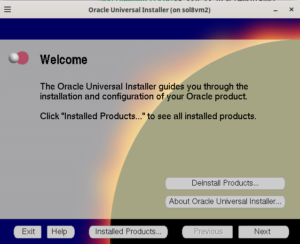
Below lists some the choices I made during the installation:
- For “File Locations”, “Destination”, /u01/app/oracle/product/8.1.6 was already selected, as this was inherited from the ORACLE_HOME variable set in my .profile.
- For UNIX Group Name, I put oinstall. It will then prompt you to run /tmp/OraInstall/orainstRoot.sh in a root terminal. Click Retry when this is done.
- Select Oracle8i Enterprise Edition for the product to install
- For “installation types”, I chose “Custom”.
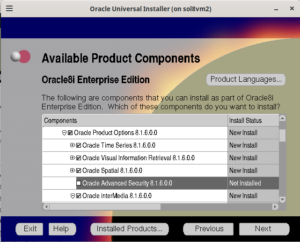
- On the Available Product Components screen, I left everything selected, except I unchecked Oracle Advanced Security. If you are going to use the Perl DBI driver for Oracle, you must ensure that this is deselected. More on this in my next post.
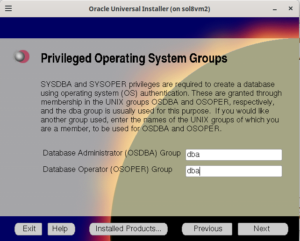
- On the Privileged Operating Systems Group screen, I put dba in for the OSDBA and OSOPER groups.
- For “database identification,” choose whatever (mattdb in my case).
- I chose to put the database files in /u01/db.
- Run /u01/app/oracle/product/8.1.6/root.sh when prompted during the database creation.
- With the Net8 installation assistant, I chose the typical configuration.
- For the Oracle Database Configuration Assistant, I just left Multipurpose selected. I left all the other defaults in place.
Configuring Oracle to start on boot
Having an init script for Oracle saves you the trouble of having to remember to run the dbstart and dbshut commands whenever you start up or shut down your Solaris system. Chapter 4 of the Oracle8i Installation Guide provides the steps for creating the init script and making Oracle start/stop automatically. I ended up using the script I wrote for 8.1.5, which is similar.
First, become the root user (su –) and edit the /var/opt/oracle/oratab file. Change the N next to your database entry to a Y:
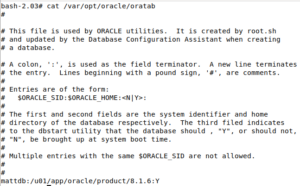
After updating this, I created the init script /etc/init.d/dbora. In addition to having the script start and stop the database, I also have it start and stop the listener.
#!/bin/sh
# Set ORA_HOME to be equivalent to the ORACLE_HOME
# from which you wish to execute dbstart and
# dbshut
# set ORA_OWNER to the user id of the owner of the
# Oracle database in ORA_HOME
ORA_HOME=/u01/app/oracle/product/8.1.6
ORA_OWNER=oracle

case "$1" in
'start')
# Start the Oracle databases:
# The following command assumes that the oracle login will not prompt the
# user for any values
su - $ORA_OWNER -c "$ORA_HOME/bin/dbstart"
su - $ORA_OWNER -c "$ORA_HOME/bin/lsnrctl start"
;;
'stop')
# Stop the Oracle databases:
# The following command assumes that the oracle login will not prompt the
# user for any values
su - $ORA_OWNER -c "$ORA_HOME/bin/dbshut"
su - $ORA_OWNER -c "$ORA_HOME/bin/lsnrctl stop"
;;
esac
I then made the script executable and linked it to the appropriate run levels:
chmod 744 /etc/init.d/dbora
ln -s /etc/init.d/dbora /etc/rc0.d/K10dbora
ln -s /etc/init.d/dbora /etc/rc2.d/S99dbora
Unfortunately the script fails to start the database. This is because the $ORA_HOME/bin/dbstart script included on the installation CD has a few bugs in it, which is surprising considering that this was commercial software. First, it specifies the wrong location for the oratab file for this particular installation: instead of /var/opt/oracle/oratab, it specifies /etc/oratab. Second, the script uses a command to determine the Oracle version that doesn’t work for this particular release. The VERSION variable is defined with the below:
VERSION=`$ORACLE_HOME/bin/svrmgrl command=exit | awk '/PL\/SQL (Release|Version)/ {substr($3,1,3) ; print substr($3,1,3)}'`
Running this command without the backticks produces no output. When the pipe to awk is removed, I would see that the output from svrmgrl will not match the regular expression:
$ORACLE_HOME/bin/svrmgrl command=exit

Oracle Server Manager Release 3.1.6.0.0 - Production

Copyright (c) 1997, 1999, Oracle Corporation.  All Rights Reserved.

Oracle8i Enterprise Edition Release 8.1.6.0.0 - Production
With the Partitioning option
JServer Release 8.1.6.0.0 - Production

Server Manager complete.
However, why would I even need the script to determine the Oracle version? The script included with the software only needs to work with that particular release. In the end, I modified both the dbstart and dbshut scripts, removing any unnecessary lines and setting the correct path to the oratab file.
:
#
# $Header: dbstart.sh.pp 09-dec-99.09:51:46 mdenney Exp $ dbstart.sh.pp Copyr (c) 1991 Oracle
#

###################################
#
# usage: dbstart
#
# This script is used to start ORACLE from /etc/rc(.local).
# It should ONLY be executed as part of the system boot procedure.
#
#####################################

ORATAB=/var/opt/oracle/oratab

trap 'exit' 1 2 3
case $ORACLE_TRACE in
    T)  set -x ;;
esac

# Set path if path not set (if called from /etc/rc)
case $PATH in
    "") PATH=/bin:/usr/bin:/etc
        export PATH ;;
esac

#
# Loop for every entry in oratab file and and try to start
# that ORACLE
#

cat $ORATAB | while read LINE
do
    case $LINE in
        \#*)            ;;      #comment-line in oratab
        *)
#       Proceed only if third field is 'Y'.
        if [ "`echo $LINE | awk -F: '{print $3}' -`" = "Y" ] ; then
            ORACLE_SID=`echo $LINE | awk -F: '{print $1}' -`
            if [ "$ORACLE_SID" = '*' ] ; then
                ORACLE_SID=""
            fi
#           Called programs use same database ID
            export ORACLE_SID
            ORACLE_HOME=`echo $LINE | awk -F: '{print $2}' -`
#           Called scripts use same home directory
            export ORACLE_HOME
#           Put $ORACLE_HOME/bin into PATH and export.
            PATH=$ORACLE_HOME/bin:/bin:/usr/bin:/etc ; export PATH
#           add for bug # 652997
            LD_LIBRARY_PATH=${LD_LIBRARY_PATH}:${ORACLE_HOME}/lib ; export LD_LIBRARY_PATH

            PFILE=${ORACLE_HOME}/dbs/init${ORACLE_SID}.ora

            pmon=`ps -ef | egrep pmon_$ORACLE_SID  | grep -v grep`
            if [ "$pmon" != "" ] ; then
               echo "Database \"${ORACLE_SID}\" already started."
            else
               if [ -f $PFILE ] ; then
                  sqlplus /nolog <<EOF
connect internal
startup
EOF

                  if test $? -eq 0 ; then
                      echo ""
                      echo "Database \"${ORACLE_SID}\" warm started."
                  else
                      echo ""
                      echo "Database \"${ORACLE_SID}\" NOT started."
                  fi
               else
                  echo ""
                  echo "Can't find init file for Database \"${ORACLE_SID}\"."
                  echo "Database \"${ORACLE_SID}\" NOT started."
               fi
            fi
        fi
        ;;
    esac
done
:
#
# $Header: dbshut.sh.pp 09-dec-99.09:51:41 mdenney Exp $ dbshut.sh.pp Copyr (c) 1991 Oracle
#

###################################
#
# usage: dbshut
#
# This script is used to shutdown ORACLE from /etc/rc(.local).
# It should ONLY be executed as part of the system boot procedure.
#
#####################################

ORATAB=/var/opt/oracle/oratab

trap 'exit' 1 2 3
case $ORACLE_TRACE in
    T)  set -x ;;
esac

# Set path if path not set (if called from /etc/rc)
case $PATH in
    "") PATH=/bin:/usr/bin:/etc
        export PATH ;;
esac

#
# Loop for every entry in oratab file and and try to start
# that ORACLE
#

cat $ORATAB | while read LINE
do
    case $LINE in
        \#*)            ;;      #comment-line in oratab
        *)
#       Proceed only if third field is 'Y'.
        if [ "`echo $LINE | awk -F: '{print $3}' -`" = "Y" ] ; then
            ORACLE_SID=`echo $LINE | awk -F: '{print $1}' -`
            if [ "$ORACLE_SID" = '*' ] ; then
                ORACLE_SID=""
            fi
#           Called programs use same database ID
            export ORACLE_SID
            ORACLE_HOME=`echo $LINE | awk -F: '{print $2}' -`
#           Called scripts use same home directory
            export ORACLE_HOME
#           Put $ORACLE_HOME/bin into PATH and export.
            PATH=$ORACLE_HOME/bin:/bin:/usr/bin:/etc ; export PATH

#           add for bug 652997
            LD_LIBRARY_PATH=${LD_LIBRARY_PATH}:${ORACLE_HOME}/lib ; export LD_LIBRARY_PATH

            pmon=`ps -ef | egrep pmon_$ORACLE_SID  | grep -v grep`
            if [ "$pmon" = "" ] ; then
                echo "Database \"${ORACLE_SID}\" already stopped."
            else
                sqlplus /nolog <<EOF
connect internal
shutdown
EOF

                if test $? -eq 0 ; then
                    echo "Database \"${ORACLE_SID}\" shut down."
                else
                    echo "Database \"${ORACLE_SID}\" not shut down."
                fi
            fi
        fi
        ;;
    esac
done
Note: all of the above code is copyright of the Oracle Corporation. I merely modified it to get it to work as it was supposed to.
Now the init script should work:
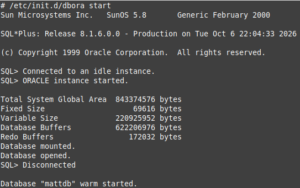
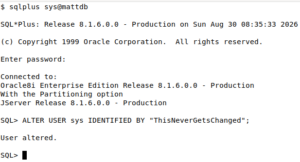
You should then be able to connect to the database with SQLPlus as the sys user: strong>sqlplus sys@your_db. The initial password for the sys account is change_on_install. This can be changed in SQLPlus with ALTER USER sys IDENTIFIED BY yourpassword;.
Loading in some data
For my test data to load into the database, I used my asset inventory system schema that I’ve used for other posts. The SQL file is below:
DROP USER inventory CASCADE;
CREATE USER inventory IDENTIFIED BY "abc1234";
GRANT connect, resource TO inventory;
ALTER USER inventory QUOTA 100M ON users;
CONNECT inventory/abc1234@mattdb;

SET AUTOCOMMIT ON;

CREATE SEQUENCE domains_seq;

CREATE TABLE domains (
    domain_id NUMBER,
    domain_name VARCHAR2(30) NOT NULL,
    PRIMARY KEY (domain_id),
    UNIQUE (domain_name)
);

CREATE OR REPLACE TRIGGER domains_on_insert
  BEFORE INSERT ON domains
  FOR EACH ROW
BEGIN
  SELECT domains_seq.nextval
  INTO :new.domain_id
  FROM dual;
END;
/

CREATE SEQUENCE locations_seq;

CREATE TABLE locations (
    location_id NUMBER,
    location_name VARCHAR2(50) NOT NULL,
    PRIMARY KEY (location_id),
    UNIQUE (location_name)
);

CREATE OR REPLACE TRIGGER locations_on_insert
  BEFORE INSERT ON locations
  FOR EACH ROW
BEGIN
  SELECT locations_seq.nextval
  INTO :new.location_id
  FROM dual;
END;
/

CREATE SEQUENCE hw_models_seq;

CREATE TABLE hw_models (
    hw_model_id NUMBER,
    hw_manufacturer VARCHAR2(30) NOT NULL,
    hw_model VARCHAR2(30) NOT NULL,
    PRIMARY KEY (hw_model_id)
);

CREATE OR REPLACE TRIGGER hw_models_on_insert
  BEFORE INSERT ON hw_models
  FOR EACH ROW
BEGIN
  SELECT hw_models_seq.nextval
  INTO :new.hw_model_id
  FROM dual;
END;
/

CREATE SEQUENCE os_seq;

CREATE TABLE operating_systems (
    os_id NUMBER,
    os_vendor VARCHAR2(30) NOT NULL,
    os_name VARCHAR2(30) NOT NULL,
    os_version VARCHAR2(10) NOT NULL,
    PRIMARY KEY (os_id)
);

CREATE OR REPLACE TRIGGER os_on_insert
  BEFORE INSERT ON operating_systems
  FOR EACH ROW
BEGIN
  SELECT os_seq.nextval
  INTO :new.os_id
  FROM dual;
END;
/

CREATE SEQUENCE inventory_seq START WITH 200000;

CREATE TABLE inventory (
    inventory_id NUMBER,
    name VARCHAR2(30) NOT NULL,
    serial_num VARCHAR2(30) NOT NULL,
    domain_id NUMBER NOT NULL,
    location_id NUMBER NOT NULL,
    hw_model_id NUMBER NOT NULL,
    os_id NUMBER NOT NULL,
    static_ip VARCHAR2(15),
    PRIMARY KEY (inventory_id),
    UNIQUE (name),
    UNIQUE (serial_num),
    FOREIGN KEY (domain_id) REFERENCES domains(domain_id),
    FOREIGN KEY (location_id) REFERENCES locations(location_id),
    FOREIGN KEY (hw_model_id) REFERENCES hw_models(hw_model_id),
    FOREIGN KEY (os_id) REFERENCES operating_systems(os_id)
);

CREATE OR REPLACE TRIGGER inventory_on_insert
  BEFORE INSERT ON inventory
  FOR EACH ROW
BEGIN
  SELECT inventory_seq.nextval
  INTO :new.inventory_id
  FROM dual;
END;
/

INSERT INTO domains (domain_name) VALUES ('dev.example.net');
INSERT INTO domains (domain_name) VALUES ('prod.example.net');
INSERT INTO domains (domain_name) VALUES ('ad.example.net');

INSERT INTO locations (location_name) VALUES ('New York Sales Office');
INSERT INTO locations (location_name) VALUES ('San Francisco Sales Office');
INSERT INTO locations (location_name) VALUES ('Raleigh, NC Office');
INSERT INTO locations (location_name) VALUES ('Atlanta Data Center');
INSERT INTO locations (location_name) VALUES ('Sacramento Data Center');

INSERT INTO hw_models (hw_manufacturer,hw_model) VALUES ('Sun Microsystems','V210');
INSERT INTO hw_models (hw_manufacturer,hw_model) VALUES ('Sun Microsystems','V240');
INSERT INTO hw_models (hw_manufacturer,hw_model) VALUES ('Sun Microsystems','X2100');
INSERT INTO hw_models (hw_manufacturer,hw_model) VALUES ('Sun Microsystems','SunBlade 100');
INSERT INTO hw_models (hw_manufacturer,hw_model) VALUES ('Sun Microsystems','SunBlade 150');
INSERT INTO hw_models (hw_manufacturer,hw_model) VALUES ('Sun Microsystems','Ultra 5');
INSERT INTO hw_models (hw_manufacturer,hw_model) VALUES ('Hewlett-Packard','Proliant DL360 G4');
INSERT INTO hw_models (hw_manufacturer,hw_model) VALUES ('Hewlett-Packard','Proliant DL360 G5');
INSERT INTO hw_models (hw_manufacturer,hw_model) VALUES ('Hewlett-Packard','Proliant DL360 G6');
INSERT INTO hw_models (hw_manufacturer,hw_model) VALUES ('Lenovo','Thinkpad T400');
INSERT INTO hw_models (hw_manufacturer,hw_model) VALUES ('Lenovo','Thinkpad T410');
INSERT INTO hw_models (hw_manufacturer,hw_model) VALUES ('Lenovo','Thinkpad T420');
INSERT INTO hw_models (hw_manufacturer,hw_model) VALUES ('Lenovo','Thinkpad X61');
INSERT INTO hw_models (hw_manufacturer,hw_model) VALUES ('Lenovo','Thinkpad X220');

INSERT INTO operating_systems (os_vendor,os_name,os_version) VALUES ('Sun Microsystems','Solaris','8');
INSERT INTO operating_systems (os_vendor,os_name,os_version) VALUES ('Sun Microsystems','Solaris','9');
INSERT INTO operating_systems (os_vendor,os_name,os_version) VALUES ('Sun Microsystems','Solaris','10');
INSERT INTO operating_systems (os_vendor,os_name,os_version) VALUES ('Red Hat','Red Hat Linux','6.2');
INSERT INTO operating_systems (os_vendor,os_name,os_version) VALUES ('Red Hat','RHEL','4.8');
INSERT INTO operating_systems (os_vendor,os_name,os_version) VALUES ('Red Hat','RHEL','5.4');
INSERT INTO operating_systems (os_vendor,os_name,os_version) VALUES ('Open Source','CentOS','4.8');
INSERT INTO operating_systems (os_vendor,os_name,os_version) VALUES ('Open Source','CentOS','5.6');
INSERT INTO operating_systems (os_vendor,os_name,os_version) VALUES ('Microsoft','Windows Server','2008R2');
INSERT INTO operating_systems (os_vendor,os_name,os_version) VALUES ('Microsoft','Windows','XP');
INSERT INTO operating_systems (os_vendor,os_name,os_version) VALUES ('Sun Microsystems','Solaris','2.6');

INSERT INTO inventory (name,domain_id,location_id,hw_model_id,os_id,static_ip,serial_num) VALUES ('jasmith-x61',3,1,13,10,NULL,'0RQ0VYOPSO');
INSERT INTO inventory (name,domain_id,location_id,hw_model_id,os_id,static_ip,serial_num) VALUES ('ddraper-x220',3,1,14,10,NULL,'UJBOLIP5IC');
INSERT INTO inventory (name,domain_id,location_id,hw_model_id,os_id,static_ip,serial_num) VALUES ('pmueller-sb100',1,3,4,2,'10.2.0.77','YMEVKDCVA2');
INSERT INTO inventory (name,domain_id,location_id,hw_model_id,os_id,static_ip,serial_num) VALUES ('pmueller-t420',3,3,12,10,NULL,'P1P7Z5WZZC');
INSERT INTO inventory (name,domain_id,location_id,hw_model_id,os_id,static_ip,serial_num) VALUES ('sac-prod-web-1',2,5,9,6,'10.0.0.5','KCJQI0GBT4');
INSERT INTO inventory (name,domain_id,location_id,hw_model_id,os_id,static_ip,serial_num) VALUES ('sac-prod-db-1',2,5,9,6,'10.0.0.15','22AZCLKDS9');
INSERT INTO inventory (name,domain_id,location_id,hw_model_id,os_id,static_ip,serial_num) VALUES ('sac-prod-fs-1',2,5,2,3,'10.0.0.22','WH52HKBUJ0');
INSERT INTO inventory (name,domain_id,location_id,hw_model_id,os_id,static_ip,serial_num) VALUES ('atl-dev-web-1',1,4,7,8,'10.10.0.50','SUVJ2H44GY');
INSERT INTO inventory (name,domain_id,location_id,hw_model_id,os_id,static_ip,serial_num) VALUES ('atl-dev-ldap-1',1,4,7,7,'10.10.0.52','02187Z7HTN');
INSERT INTO inventory (name,domain_id,location_id,hw_model_id,os_id,static_ip,serial_num) VALUES ('atl-dev-db-1',1,4,7,8,'10.10.0.54','RDH3MOM9KP');

CREATE TABLE recycling_bin (
    inventory_id NUMBER,
    name VARCHAR2(30) NOT NULL,
    serial_num VARCHAR2(30) NOT NULL,
    domain_id NUMBER NOT NULL,
    location_id NUMBER NOT NULL,
    hw_model_id NUMBER NOT NULL,
    os_id NUMBER NOT NULL,
    static_ip VARCHAR2(15),
    delete_ts DATE,
    PRIMARY KEY (inventory_id),
    UNIQUE (name),
    UNIQUE (serial_num)
);

CREATE OR REPLACE TRIGGER inventory_on_delete
  BEFORE DELETE ON inventory
  FOR EACH ROW
BEGIN
  INSERT INTO recycling_bin
  (inventory_id,
    name,
    serial_num,
    domain_id,
    location_id,
    hw_model_id,
    os_id,
    static_ip,
    delete_ts
   )
  values(:old.inventory_id,
            :old.name,
            :old.serial_num,
            :old.domain_id,
            :old.location_id,
            :old.hw_model_id,
            :old.os_id,
            :old.static_ip,
            SYSDATE);
END;
/

SET AUTOCOMMIT OFF;
The file can be loaded in from SQLPlus with the command @./inventory.sql.
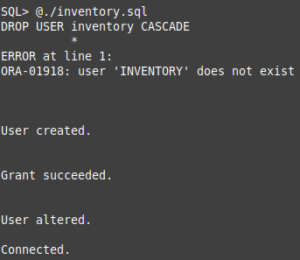
And then queried:
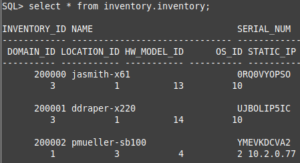
Note: I planning on adding columns that store the creation and last-updated dates, but I haven’t gotten around to it yet.
Solaris 7 Notes
The VirtualBox configuration for Solaris 7 is for the most part the same as it is for Solaris 8. One difference is that you’ll need to add an I82078 floppy controller to boot the x86 Device Configuration Assistant floppy image, as the Solaris 7 CD-ROM isn’t bootable.
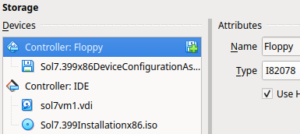
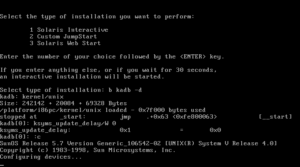
Another issue that I ran into occurred when after I selected the Solaris Interactive installation type. Here the machine would kernel-panic.
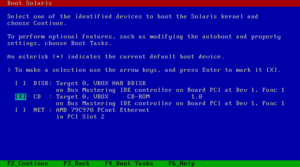
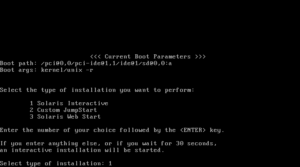
Fortunately, someone way smarter than I has found a solution in the past, in this blog post: Solaris 7 Boot Panic. All credit for this solution is due to the author of this (Michal Necasek).
- At the Select type of installation prompt, enter b kadb -d. Hit Enter, then Enter again. The will boot into kernel debugger mode.
- At the kadb prompt, type ksyms_update_delay/W 0, hit Enter, type :c, and then hit Enter again. The installation can now proceed.
After the installation, I installed the Solaris 7 x86 recommended patch cluster, which can be found here.
Another issue with Solaris 7 x86 is that there isn’t an OpenSSH package for it. SunFreeware release an OpenSSH package for Solaris 7 SPARC, but not for x86. This means you’ll have to use RSH for remote access. I never could get X11 forwarding to work, gave up, and just installed Oracle 8i from the desktop, which sucked. Oracle 8i did start and stop using my modified scripts, and I was able to load data into it. In the end, however, I didn’t see any reason to use Solaris 7, as this version of Oracle runs on 8 without any issues and 8 has an OpenSSH package available for it. There are limits to how much I’m willing to simulate the 90s Solaris SysAdmin experience.
Conclusion
It took me about two months to finish this post. I’ve been on a stressful project at work and most nights I don’t want to look at a computer screen. This is only the first part of two posts on Oracle 8i and Solaris 8. The second part will discuss the work required to compile the Perl Oracle driver, DBD::Oracle, on Solaris 8. I also want to try serving a CGI page from Apache on Solaris 8. As always, thanks for reading!