
Introduction
In my last post, I discussed how I wrote a Perl script that uses a YAML file to build a list of virtual machines on the Xen hypervisor. When the script was nearly complete, it occurred to me: why not modify this script for use with libvirt/KVM? I mainly use KVM instead of Xen because of its better support for Enterprise Linux. Often, when I need to spin up a set of virtual machines for testing, I use dmacvicar/libvirt provider for Terraform. Usually this works pretty well; however, sometimes I get annoyed at having to learn the HCL language and just want to define a list of VMs with my specs. That is where I can see this script being of use, at least for myself. Of course, my intention was not to replace Terraform, even for myself. Mainly, this was a fun project that exercised my Perl skills and taught me stuff about Linux networking, libvirt, and more.
KVM host setup
I will be honest: parts of this section will be copied from my last post, as there are many similarities between the two setups. For the host OS, I tested this on a few different Linux distributions, all initially Debian/Ubuntu variants: my Linux Mint desktop, Ubuntu 24.04, and Debian 13 (12 should work as well). My desktop used only one NIC with br0 as the network bridge. The Debian systems, on the other hand, have multiple NICs, with one dedicated to management traffic (SSH, etc.) and another one (or two in a bonded NIC setup) dedicated to VM traffic on a separate VLAN (or multiple VLANs). Dnsmasq runs on the host, providing DNS and DHCP services to the VMs. My router and my managed switch have been configured to route traffic for this VLAN. Below is how I configured networking for the Debian hosts with two NICs and a separate VLAN for the VMs:
- Install the bridge-utils and vlan packages: sudo apt install -y bridge-utils vlan
- On one host (an ornery HP Proliant DL360 G7 from 2011) I had to do the following as root: modprobe 8021q && echo 8021q > /etc/modules-load.d/8021q.conf.
- Configure a bridge interface on the second NIC by appending to /etc/network/interfaces similar to the below code snippet. Note: the bridge will need to have a static IP address for dnsmasq.
- Restart the networking service with: sudo systemctl restart networking
auto enp2s0
iface enp2s0 inet manual

auto enp2s0.40
iface enp2s0.40 inet manual

auto br40
iface br40 inet static
  address 192.168.40.2/24
  bridge_ports enp2s0.40
  bridge_stp off
  bridge_waitport 0
  bridge_fd 0
You don’t have to use dnsmasq with the script. If you want to manage your DHCP service elsewhere, you can exclude dnsmasq in the YAML file for the script—more on this later. If you have only one NIC and just want to do a simple bridge, /etc/network/interfaces can be set to something like below:
# The primary network interface
allow-hotplug eno1
iface eno1 inet manual

auto br0
iface br0 inet static
  address 192.168.40.2/24
  gateway 192.168.40.1
  bridge_ports eno1
  bridge_stp off
  bridge_waitport 0
  bridge_fd 0
Or for DHCP:
# The primary network interface
allow-hotplug eno1
iface eno1 inet manual

auto br0
iface br0 inet dhcp
  bridge_ports eno1
  bridge_stp off
  bridge_waitport 0
  bridge_fd 0
Since the HP ProLiant DL360 G7 I have has 4 NICs, I decided to attempt to set up a network bond with two interfaces. This in theory should provide fault tolerance in the event of a link failure, and in an enterprise environment these would go to redundant switches. For lab use it is certainly an overkill, but it helped me learn more about Linux networking. For this exercise, I configured the bonded NIC pair in active-backup mode, as I couldn’t get active-active mode to work (I’m still looking into this). Before setting up the interfaces, you will need to install the bonding module (sudo apt install ifenslave) and enable the module (as root): modprobe bonding && echo bonding > /etc/modules-load.d/bonding.conf. Then append something similar to the below code snippet in /etc/network/interfaces:
auto enp3s0f1
iface enp3s0f1 inet manual

auto enp4s0f0
iface enp4s0f0 inet manual

auto bond0
iface bond0 inet manual
  bond-mode active-backup
  bond-primary enp3s0f1
  bond-slaves enp3s0f1 enp4s0f0
  bond-miimon 1000

auto bond0.40
iface bond0.40 inet manual

auto br40
iface br40 inet static
  address 192.168.40.2/24
  bridge_ports bond0.40
  bridge_stp off
  bridge_waitport 0
  bridge_fd 0
And restart the networking service with: sudo systemctl restart networking. If not using VLANs, you can use something like below:
auto enp3s0f1
iface enp3s0f1 inet manual

auto enp4s0f0
iface enp4s0f0 inet manual

auto bond0
iface bond0 inet manual
  bond-mode active-backup
  bond-primary enp3s0f1
  bond-slaves enp3s0f1 enp4s0f0
  bond-miimon 1000

auto br0
iface br40 inet static
  address 192.168.40.2/24
  bridge_ports bond0
  bridge_stp off
  bridge_waitport 0
  bridge_fd 0
With Ubuntu server things are different, as it uses the Netplan tool to manage network interfaces. First, install bridge-utils (sudo apt install -y bridge-utils) and modify /etc/netplan/50-cloud-init.yaml to something similar to the below (following the guide here). In my case, I had two NICs, with enp2s0 being used for VM traffic:
network:
  version: 2
  ethernets:
    enp3s0:
      dhcp4: true
    enp2s0: {}
  bridges:
    br40:
      addresses: [ 192.168.40.2/24 ]
      interfaces: [ vlan40 ]
  vlans:
    vlan40:
      accept-ra: no
      id: 40
      link: enp2s0
Then apply the changes with: sudo netplan apply.
And to configure everything else on the host for this exercise:
- Install the necessary packages: sudo apt install ‐‐no-install-recommends qemu-kvm libvirt-daemon-system libvirt-daemon virtinst libosinfo-bin libguestfs-tools dnsmasq libtemplate-perl libyaml-libyaml-perl.
- Un-comment this line in /etc/dnsmasq.conf: conf-dir=/etc/dnsmasq.d/,*.conf
- Create something similar to the below file, /etc/dnsmasq.d/01-kvm.conf.
- Restart dnsmasq: sudo systemctl restart dnsmasq
listen-address=::1,127.0.0.1,192.168.40.2
no-resolv
no-hosts
server=192.168.1.1
domain=ridpath.lab
dhcp-range=192.168.40.100,192.168.40.200,12h
dhcp-option=3,192.168.40.1
dhcp-option=6,192.168.40.2
Obtaining cloud images
For this exercise, I used the cloud images that can be downloaded from AlmaLinux, Debian, and Ubuntu. However, you are not limited to these, as most cloud images published by Linux distributions should work in KVM.
- Debian images can be found here. Select the OS release (I only have tested bookworm/12 and trixie/13), “latest”, then the generic-amd64.qcow2 image.
- Ubuntu images can be found here. I’ve only tried the “noble” release. Download the server-cloudimg-amd64.img image.
- AlmaLinux images can be found here.
The script
As noted before, the script is written in Perl and uses the Template::Toolkit and YAML::XS modules. The package names for these in Debian are libtemplate-perl and libyaml-libyaml-perl. The script uses six files:
- A project.yml or project.yaml file. This is the file that contains the YAML parameters for the script. You can call it whatever you want, as long as it has a .yml or .yaml extension. I named mine db.yaml. The project name will be taken from the filename without the extension.
- ansible_inventory.tt. This is a Template-Toolkit template file to parse an Ansible inventory file from the YAML. You won’t need it unless ansible_inventory is set to 1 in the YAML file. The parsed file will be named <project>_inventory.
- reservations.tt. This is a Template-Toolkit template file to parse a dnsmasq configuration file with DHCP reservations and DNS records. The parsed file will be located in /etc/dnsmasq.d/99_<project>.conf. You won’t need it if nodnsmasq is set to 1 in the YAML file.
- user-data file for cloud-init.
- ProvVMs.pm. This contains the subroutines for the script.
- prov_kvm_yaml.pl: the script itself.
The code snippets for the two template files are below. They receive variables from ProvVMs.pm:
[% FOREACH host IN ansible_hosts -%]
[% host.key %][% IF host.value.ip != '' %] ansible_host=[% host.value.ip %][% END %]
[% END -%]

[% FOREACH group IN ansible_groups -%]
[% "[" %][% group.key %][% "]" %]
[% FOREACH member IN group.value.sort -%]
[% member %]
[% END -%]

[% END -%]
# DHCP reservations
[% FOREACH resv IN reservations -%]
dhcp-host=[% resv.value.mac %],[% resv.value.ip %],[% resv.key %]
[% END -%]

# DNS records
[% FOREACH resv IN reservations -%]
address=/[% resv.key %]/[% resv.value.ip %]
[% END -%]
Next, I will (attempt) to explain the format of the .yaml/yml file. The file will consist of optional single-value global parameters, and an instances hash that defines the virtual machines and machine parameters. First, the list of global parameters you can set:
- ansible_inventory. Set to 1 to parse an Ansible inventory file (<project>_inventory).
- default_bridge: the default network bridge to use. Default is br0. Setting this is recommended.
- default_disk_size (in GB). If not specified, defaults to 10.
- default_image: full path to the default cloud image to use. There is no default set for this and if you choose not to set it, you will need to set the image: <image> parameter for each instance. Therefore, setting this parameter is recommended.
- default_os_type: the OS type to use for virt-install, such as debian13. The default value is linux2020. The full list of OS types can be retrieved with the command osinfo-query os. The value is also validated against this list.
- default_ram (in MB). If not specified, defaults to 1024.
- default_user_data_file: specify the path to an alternative default user-data file for cloud-init. By default it uses the file user-data in the same directory as the script.
- default_vcpu: default number of virtual CPUs. Default is 1.
- disk_path: the default directory where disk images are stored for all instances. Default is /var/lib/libvirt/images.
- nodnsmasq. Default is 0. Set to 1 to disable dnsmasq.
- domain: the default domain for all instances. Default is localdomain. This is only used for dnsmasq and the Ansible inventory.
Below is a code snippet with each parameter set. As noted previously, all of these are optional, but some are recommended.
---
ansible_inventory: 1
default_bridge: br0
default_disk_size: 20
default_image: /var/lib/libvirt/images/debian-13-generic-amd64.qcow2
default_os_type: debian13
default_ram: 2048
default_vcpu: 1
disk_path: /var/lib/libvirt/images
nodnsmasq: 0
domain: example.net
Now for the instances section of the YAML file. For each instance, the below optional parameters can be set to override the defaults:
- ansible_groups: an array/list of Ansible groups to add the machine to.
- autostart: set to 1 if the instance should be started when the host is booted.
- bridge: the network bridge for the instance.
- disk: a size in GB for the main OS disk.
- disk_path: a path to the directory where the instance’s disk(s) will be stored.
- domain: the instance’s domain.
- image: the path to an OS cloud image to use.
- ip: an IP for use with dnsmasq. If the global parameter dnsmasq is set to 0, this is ignored, except if used by the Ansible inventory.
- mac: a MAC address for the instance. Useful if you’re managing the DNS reservation elsewhere.
- os_type: the OS type for virt-install, such as debian13. The complete list of OS types can be obtained with the command osinfo-query os.
- ram: the RAM size in MB.
- skip: set to 1 to skip over an instance. This ensures that it won’t get deleted by mistake.
- user_data_file: the path to an alternative cloud-init user-data file.
- additional_disks: a hash/dictionary for specifying additional disks. Each accepts three parameters: size (in GB, required) and path (defaults to the same path as the OS disk).
Below is a sample code snippet with all of these parameters set and none of them set:
---
instances:
  db1:
    autostart: 1
    bridge: br10
    ip: 192.168.10.10
    ram: 4096
    disk: 20
    disk_path: /nfs/kvm
    domain: db.example.net
    image: /nfs/kvm/noble-server-cloudimg-amd64.qcow2
    mac: 00:11:22:33:44:dd
    os_type: ubuntu24.04
    user_data_file: /usr/local/etc/user-data_mysql
    additional_disks:
      data:
        size: 30
        path: /nfs/mysql
    ansible_groups:
      - db
  web1: {}
Finally, here is a code snippet with some parameters set. It is for provisioning a Galera cluster with a ProxySQL load balancer pair:
---
default_bridge: br40
default_image: /var/lib/libvirt/images/debian-13-generic-amd64.qcow2
default_os_type: debian13
domain: ridpath.lab
ansible_inventory: 1
instances:
  galera1:
    ip: 192.168.40.30
    ram: 2048
    disk: 20
    additional_disks:
      data:
        size: 30
    ansible_groups:
      - db
  galera2:
    ip: 192.168.40.31
    ram: 2048
    disk: 20
    additional_disks:
      data:
        size: 30
    ansible_groups:
      - db
  galera3:
    ip: 192.168.40.32
    ram: 2048
    disk: 20
    additional_disks:
      data:
        size: 30
    ansible_groups:
      - db
  proxysql1:
    ip: 192.168.40.33
    ram: 1024
    disk: 10
    ansible_groups:
      - db_proxy
  proxysql2:
    ip: 192.168.40.34
    ram: 1024
    disk: 10
    ansible_groups:
      - db_proxy
The user-data file for cloud-init is basic, adding a user and setting the root password:
#cloud-config

users:
  - name: ansible_user
    passwd: $6$7JnhIhkmDNu4rkr8$1NPhvMbqW.dsPmQBgQ6fIbptd2mqw49byvMdjIldnlg.AW44PR7YNa0esI9lXCS2PY8XIIEqdY4.kBmyvQUuJ.
    ssh_authorized_keys:
      - ssh-ed25519 pubkey1 mattpubkey1
      - ssh-ed25519 pubkey1 mattpubkey1
    groups: sudo
    sudo: ALL=(ALL) ALL
    shell: /bin/bash
    lock_passwd: false

ssh_pwauth: true
ssh_deletekeys: true

chpasswd:
  expire: false
  users:
    - name: root
      password: $6$7JnhIhkmDNu4rkr8$1NPhvMbqW.dsPmQBgQ6fIbptd2mqw49byvMdjIldnlg.AW44PR7YNa0esI9lXCS2PY8XIIEqdY4.kBmyvQUuJ.
Now for the module file, ProvVMs.pm. This contains all of the subroutines.
use strict;
use warnings;
use Template;

package ProvVMs;
require Exporter;

our @ISA = qw(Exporter);
our @EXPORT = qw(mac_gen validate_ip check_bridge check_image create_ci_iso osinfo_query parse_ansible_inventory parse_reservations_file parse_xen_conf clean_leases_file);

# Generate a random MAC address.
sub mac_gen {
    my @m;
    my $x = 0;
    while ($x < 3) {
        $m[$x] = int(rand(256));
        $x++;
    }
    my $mac = sprintf("00:16:3E:%02X:%02X:%02X", @m);
    return $mac;
}

# Regex-validate an IP address.
sub validate_ip {
    my $ip = $_[0];
    unless ($ip =~ /^(\d{1,3}\.){3}\d{1,3}$/) {
      die "$ip failed regex IP test. Exiting.\n";
    }
}

# Check if bridge interface is valid.
sub check_bridge {
    my $bridge = $_[0];
    unless ($bridge =~ /^(vir|vm)?br\d{1,4}$/) {
        die "Bridge interface identifier invalid. It must be like br0, etc.\n";
    }
    unless (-x '/usr/sbin/brctl') {
        die "bridge-utils are missing!\n";
    }
    my $bridge_found = 0;
    open(BRCTL, '/usr/sbin/brctl show |') || die "brctl show failed!\n";
    while (my $line = <BRCTL>) {
        if ($line =~ /^$bridge\s+/) {
            $bridge_found = 1;
            last;
        }
    }
    close(BRCTL);
    if ($bridge_found == 0) {
        die "Bridge interface $bridge not present!\n";
    }
}

# Run qemu-image info on the base image and check if the size is sufficient.
sub check_image {
    my($cloud_image, $disk_size) = @_;

    unless (-x '/usr/bin/qemu-img') {
        die "qemu-utils are missing!\n";
    }
    my($cloud_img_size, $img_fmt);
    open(QEMU_IMG, "/usr/bin/qemu-img info $cloud_image |") || die "qemu-img info $cloud_image failed!\n";
    while (my $line = <QEMU_IMG>) {
        if ($line =~ /file format:\s+(qcow2|raw)/) {
            $img_fmt = $1;
        }
        if ($line =~ /virtual size:\s+(\d+)/) {
            $cloud_img_size = $1;
        }
    }
    close(QEMU_IMG);
    if ($cloud_img_size > $disk_size) {
        die "Disk size ${disk_size}GB is smaller than the virtual size of disk image ${cloud_image}. It must be at least ${cloud_img_size}GB.\n";
    }
    return($img_fmt);
}

# Create the cloud-init ISO
sub create_ci_iso {
    my($name, $user_data_file) = @_;

    unless (-x '/usr/bin/genisoimage') {
        die "genisoimage is missing!\n";
    }

    mkdir("/tmp/${name}_ci");
    system("cp $user_data_file /tmp/${name}_ci/user-data");
    open(META_DATA, '>', "/tmp/${name}_ci/meta-data");
    print META_DATA "instance-id: ${name}\nlocal-hostname: ${name}\n";
    close(META_DATA);
    system("/usr/bin/genisoimage -quiet -output /tmp/${name}_ci.iso -V cidata -r -J /tmp/${name}_ci/user-data /tmp/${name}_ci/meta-data") == 0 || die "genisoimage failed!\n";
}

# Validate OS type for virt-install with osinfo-query.
sub osinfo_query {
    my $os_type = $_[0];

    unless (-x '/usr/bin/osinfo-query') {
        die "osinfo-query is missing!\n";
    }

    system("/usr/bin/osinfo-query os short-id=${os_type} > /dev/null") == 0 || die "OS type $os_type is invalid or osinfo-query failed! Please check.\n";
}

# Parse an Ansible inventory file
sub parse_ansible_inventory {
    my $file = $_[0];
    my $template = $_[1];
    die "Template file $template not found!\n" unless (-f $template);
    my $vars = {
        ansible_hosts  => $_[2],
        ansible_groups => $_[3]
    };

    print "Creating Ansible inventory file ${file}\n";
    my $tt = Template->new();
    $tt->process($template, $vars, $file) || die $tt->error;
}

# Create a dnsmasq reservations file in /etc/dnsmasq.d
sub parse_reservations_file {
    my $file = '/etc/dnsmasq.d/' . $_[0];
    my $template = $_[1];
    die "Template file $template not found!\n" unless (-f $template);
    my $vars = {
        reservations => $_[2]
    };

    print "Creating dnsmasq reservations file $file and restarting dnsmasq.\n";
    my $tt = Template->new();
    $tt->process($template, $vars, $file) || die $tt->error;
    system('/usr/bin/systemctl restart dnsmasq') == 0 || die "dnsmasq failed to restart!\n";
}

# Parse /etc/xen/hostname.cfg
sub parse_xen_conf {
    my $name = $_[0];
    my $xen_vars = {
        name      => $name,
        bridge    => $_[1],
        ram       => $_[2],
        vcpu      => $_[3],
        disk_img  => $_[4],
        mac       => $_[5],
        add_disks => $_[6]
    };

    my $template = $_[7];
    my $xen_tt = Template->new();
    $xen_tt->process($template, $xen_vars, "/etc/xen/${name}.cfg") || die $xen_tt->error;
}

# Takes a list of list of IP addresses and removes them from the dnsmasq lease file.
sub clean_leases_file {
    my @ips = @_;
    my @line_split;
    open(LEASES_IN, '<', '/var/lib/misc/dnsmasq.leases') || die "Unable to open /var/lib/misc/dnsmasq.leases.\n";
    open(LEASES_OUT, '>', '/tmp/dnsmasq.leases') || die "Unable to open /tmp/dnsmasq.leases.\n";
    while (my $line = <LEASES_IN>) {
        @line_split = split(/\s+/, $line);
        if (grep { $_ eq $line_split[2] } @ips) {
            next;
        } else {
            print LEASES_OUT $line;
        }
    }
    close(LEASES_IN);
    close(LEASES_OUT);
    system('cp /tmp/dnsmasq.leases /var/lib/misc/dnsmasq.leases');
}
Last, the script itself, prov_kvm_yaml.pl. The script assumes that all files (ProvVMs.pm, the template files, etc.) are in the current working directory, and that it will be run with sudo ./prov_kvm_yaml.pl yaml_file. It accepts the following options:
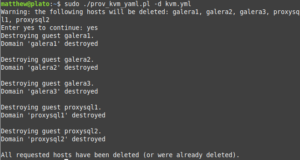
- -d: delete, instead of provision. It will require confirmation, similar to Terraform.
- -h comma-separated list of hosts: a comma-separated list of hosts to limit operations to. For example, when combined with -d, it will only delete the specified hosts.
The script will not overwrite an instance if it already exists; you must delete it first. This is when the -d and -h host1,host2,… options come in handy. The script won’t delete anything not present in the YAML file, so if you want to keep something from being deleted by mistake (an instance or an additional disk), simply remove it from the YAML file (or set skip: 1 on an instance to skip over that instance).
#!/usr/bin/perl -w

use strict;
use Getopt::Long;
use YAML::XS 'LoadFile';
use lib qw(.);
use ProvVMs;

my($delete, $help, $hosts);
GetOptions ("delete"  => \$delete,
            "hosts=s" => \$hosts
);

# Script requires specifying a project.yml or project.yaml file to process.
my $yaml_file = $ARGV[0] || die "You must specify a .yml or .yaml file.\n";
my $proj_name;
unless ($yaml_file =~ /^(\S+)\.(yaml|yml)$/) {
    die "File must be a .yml or .yaml file.\n";
} else {
    $proj_name = $1;
}

# Check if virsh and virt-install are present.
foreach my $prog (qw( virsh virt-install )){
    die "$prog not found!\n" unless (-x "/usr/bin/${prog}");
}

die "YAML file $yaml_file not found!\n" unless (-f $yaml_file);
my $yaml = YAML::XS::LoadFile($yaml_file) || die "Unable to load YAML file!\n";

# If -h host1,host2... is specified, limit operations to the listed instances.
my @limit_hosts;
if ($hosts) {
  @limit_hosts = split(/,/, $hosts);
}
my $default_disk_path = $yaml->{'disk_path'} || '/var/lib/libvirt/images';
my $nodnsmasq = $yaml->{'nodnsmasq'} || 0;

# The delete section of the script. When -d is specified without -h, everything is deleted.
# When -h host1,host2... is specified, only the listed hosts are deleted.
# After all operations are completed, the script exits.
if ($delete) {
    my @hosts_delete;
    if (@limit_hosts) {
        foreach my $host (@limit_hosts) {
            if ($yaml->{'instances'}->{$host}) {
                push(@hosts_delete, $host);
            } else {
                warn "Warning: host $host not found in $yaml_file.\n";
            }
        }
    } else {
        @hosts_delete = sort(keys(%{$yaml->{'instances'}}));
        if (($nodnsmasq == 0) && (-f "/etc/dnsmasq.d/99_${proj_name}.conf")) {
            unlink("/etc/dnsmasq.d/99_${proj_name}.conf");
            system('/usr/bin/systemctl restart dnsmasq') == 0 || die "dnsmasq failed to restart!\n";
        }
    }
    print 'Warning: the following hosts will be deleted: ' . join(', ', @hosts_delete) . "\n";
    print 'Enter yes to continue: ';
    chomp(my $selection = <STDIN>);
    exit unless ($selection eq 'yes');
    foreach my $host (@hosts_delete) {
        # Set skip: 1 to skip over this instance.
        if (($yaml->{'instances'}->{$host}->{'skip'}) && ($yaml->{'instances'}->{$host}->{'skip'} == 1)) {
            print "Skipping instance $host because skip is set to 1.\n";
            next;
        }
        print "Destroying guest $host.\n";
        if (system("/usr/bin/virsh domstate $host 2>&1 |grep -q running") == 0) {
            system("/usr/bin/virsh destroy $host") == 0 || die "virsh destroy $host failed!\n";
        }
        if (system("/usr/bin/virsh dominfo $host > /dev/null 2>&1") == 0) {
            system("/usr/bin/virsh undefine $host > /dev/null");
        } else {
          print "Guest $host not found. Perhaps the guest was already deleted?\n";
        }
        my $disk_path = $yaml->{'instances'}->{$host}->{'disk_path'} || $default_disk_path;
        unlink("${disk_path}/${host}.qcow2") if (-f "${disk_path}/${host}.qcow2");
        if ($yaml->{'instances'}->{$host}->{'additional_disks'}) {
            while (my($disk_name, $disk_params) = each %{$yaml->{'instances'}->{$host}->{'additional_disks'}}) {
                my $add_disk_path = $disk_params->{'path'} || $disk_path;
                unlink("${add_disk_path}/${host}_${disk_name}.qcow2") if (-f "${add_disk_path}/${host}_${disk_name}.qcow2");
            }
        }
    }
    print "All requested hosts have been deleted (or were already deleted).\n";
    exit;
}

# All code below here is used for provisioning/creating hosts.

# Create default disk path
unless (-d $default_disk_path) {
    system("mkdir -p $default_disk_path");
}

# Read in default bridge from the YAML file and check if it exists with brctl.
my $default_bridge = 'br0';
unless ($yaml->{'default_bridge'}) {
    warn "Warning: default_bridge not set in $yaml_file. Using br0.\n";
} else {
    $default_bridge = $yaml->{'default_bridge'};
}
&check_bridge($default_bridge);

# Read in default image file from the YAML file.
my $default_image;
unless ($yaml->{'default_image'}) {
    warn "Warning: default_image not set in $yaml_file. You must set image: <image> for each instance.\n";
} else {
    $default_image = $yaml->{'default_image'};
    die "Image $default_image not found!\n" unless (-f $default_image);
}

# Set other defaults.
my $default_disk_size = $yaml->{'default_disk_size'} || 10;
my $default_ram = $yaml->{'default_ram'} || 1024;
my $default_vcpu = $yaml->{'default_vcpu'} || 1;
my $domain = $yaml->{'domain'} || 'localdomain';
my $ansible_inventory = $yaml->{'ansible_inventory'} || 0;
my $default_os_type = $yaml->{'default_os_type'} || 'linux2020';
my $default_user_data_file = $yaml->{'default_user_data_file'} || 'user-data';
die "Default user-data file $default_user_data_file not found!\n" unless (-f $default_user_data_file);
&osinfo_query($default_os_type);

# Processing the instances hash in the YAML file.
my($ansible_groups, $instances, $reservations, $ansible_hosts);
my(@static_ips, @checked_bridges, @checked_os_types);
print "Creating disk images for any new instances.\n";
while (my($inst, $vals) = each %{$yaml->{'instances'}}) {
    # Allow setting domain: <domain> on an individual instance.
    my $inst_domain = $vals->{'domain'} || $domain;
    $ansible_hosts->{"${inst}.${inst_domain}"} = {};
    # ip: <ip> is optional, as you may want to configure the DHCP reservation elsewhere.
    if ($vals->{'ip'}) {
        die "Static IP has already been used for another instance! Please check YAML file.\n" if (grep { $_ eq $vals->{'ip'}} @static_ips);
        $reservations->{"${inst}.${inst_domain}"} = {};
        $reservations->{"${inst}.${inst_domain}"}->{'ip'} = $vals->{'ip'};
        $ansible_hosts->{"${inst}.${inst_domain}"}->{'ip'} = $vals->{'ip'};
        push(@static_ips, $vals->{'ip'});
    } else {
        $ansible_hosts->{"${inst}.${inst_domain}"}->{'ip'} = '';
    }
    # For the Ansible inventory file. If ansible_groups is specified for the instance,
    # add the instance to that group.
    if ($vals->{'ansible_groups'}) {
        foreach my $group (@{$vals->{'ansible_groups'}}) {
            unless ($ansible_groups->{$group}) {
                @{$ansible_groups->{$group}} = ();
            }
            push(@{$ansible_groups->{$group}}, "${inst}.${inst_domain}");
        }
    }
    # Skip VM if it already exists.
    if (system("/usr/bin/virsh dominfo $inst > /dev/null 2>&1") == 0) {
        if ($reservations->{"${inst}.${inst_domain}"}) {
            open(DOMIFLIST, "/usr/bin/virsh domiflist $inst |") || die "Unable to open virsh domiflist ${inst}.\n";
            while (my $line = <DOMIFLIST>) {
                if ($line =~ /\s+vnet0\s+/) {
                    $line =~ s/^\s+|\s+$//g;
                    my @line_split = split(/\s+/, $line);
                    $reservations->{"${inst}.${inst_domain}"}->{'mac'} = $line_split[4];
                }
            }
            close(DOMIFLIST);
        }
        next;
    }
    # Set skip: 1 to skip over this instance.
    if (($vals->{'skip'}) && ($vals->{'skip'} == 1)) {
        print "Skipping instance $inst because skip is set to 1.\n";
        delete($reservations->{"${inst}.${inst_domain}"});
        next;
    }
    # Skip if -h host1,host2 is set and host isn't in that list.
    if ((@limit_hosts) && !(grep { $_ eq $inst } @limit_hosts)) {
        delete($reservations->{"${inst}.${inst_domain}"});
        next;
    }
    print "Creating disk(s) for $inst.\n";
    if (!($default_image) && !($vals->{'image'})) {
        die "No default image was defined nor was an image set for instance ${inst}. Please check and try again.\n";
    }
    # Use the default image if one isn't set for the individual instance.
    my $image = $default_image;
    if ($vals->{'image'}) {
        $image = $vals->{'image'};
        die "Image $image not found!\n" unless (-f $image);
    }
    my $disk_size = $vals->{'disk'} || $default_disk_size;
    # Make sure that image exists and can be resized to the specified size.
    &check_image($image, $disk_size);

    # Use the default bridge if one isn't set for the individual instance.
    # If one is specified, make sure that it exists.
    my $bridge = $default_bridge;
    if ($vals->{'bridge'}) {
        $bridge = $vals->{'bridge'};
        unless (grep { $_ eq $bridge } @checked_bridges) {
            push(@checked_bridges, $bridge) if (&check_bridge($bridge));
        }
    }

    # Use the default OS type if one isn't set for the individual instance.
    # If one is specified, make sure that it is valid.
    my $os_type = $default_os_type;
    if ($vals->{'os_type'}) {
        $os_type = $vals->{'os_type'};
        unless (grep { $_ eq $os_type } @checked_os_types) {
            push(@checked_os_types, $os_type) if (&osinfo_query($os_type));
        }
    }

    my $mac = $vals->{'mac'} || &mac_gen;
    if ($reservations->{"${inst}.${inst_domain}"}) {
        $reservations->{"${inst}.${inst_domain}"}->{'mac'} = $mac;
    }

    # Use the default disk path if one isn't set for the individual instance.
    # If one is specified, make sure that it exists.
    my $disk_path = $default_disk_path;
    if ($vals->{'disk_path'}) {
        $disk_path = $vals->{'disk_path'};
        die "Disk path $disk_path doesn't exist! Please check.\n" unless (-d $disk_path);
    }

    # Copy the cloud image to file for the instance.
    my $disk_image = "${disk_path}/${inst}.qcow2";
    # Change this to use rsync if you want a progress bar.
    system("cp $image $disk_image") == 0 || die "cp $image $disk_image failed!\n";
    system("/usr/bin/qemu-img resize -q -f qcow2 $disk_image ${disk_size}G") == 0 || die "qemu-img resize -q -f qcow2 ${disk_image} ${disk_size}G failed!\n";

    # Processing the additional_disks section for the instance, if specified.
    # It follows the format of:
    #  name:
    #    size: 30
    #    path: <directory>
    # Size is in GB.
    # Note: this doesn't format the disk inside the instance. You must use cloud-init or do it manually.
    my @additional_disks;
    if ($vals->{'additional_disks'}) {
        while (my($disk_name, $disk_params) = each %{$vals->{'additional_disks'}}) {
            die "You must specify a size in GB for disk ${disk_name}, instance ${inst}!\n" unless (($disk_params->{'size'}) && ($disk_params->{'size'} =~ /^\d+$/));
            my $size = $disk_params->{'size'};
            my $add_disk_path = $disk_path;
            if ($disk_params->{'path'}) {
                $add_disk_path = $disk_params->{'path'};
                die "Additional disk path $add_disk_path not found! Please check.\n" unless (-d $add_disk_path);
            }
            system("/usr/bin/qemu-img create -q -f qcow2 ${add_disk_path}/${inst}_${disk_name}.qcow2 ${size}G") == 0 ||
                die "qemu-img create -q -f qcow2 ${add_disk_path}/${inst}_${disk_name}.qcow2 ${size}G failed!\n";
            push(@additional_disks, "${add_disk_path}/${inst}_${disk_name}.qcow2");
        }
    }

    # Use the default cloud-init user-data file unless one is specified for the instance.
    my $user_data_file = $default_user_data_file;
    if ($vals->{'user_data_file'}) {
        $user_data_file = $vals->{'user_data_file'};
        die "user-data file $user_data_file not found!\n" unless (-f $user_data_file);
    }

    open(META_DATA, '>', "/tmp/${inst}_meta-data");
    print META_DATA "instance-id: ${inst}\nlocal-hostname: ${inst}\n";
    close(META_DATA);

    $instances->{$inst} = {
        'bridge'           => $bridge,
        'ram'              => $vals->{'ram'} || $default_ram,
        'disk_image'       => $disk_image,
        'vcpu'             => $vals->{'vcpu'} || $default_vcpu,
        'mac'              => $mac,
        'os_type'          => $os_type,
        'user_data_file'   => $user_data_file,
        'additional_disks' => \@additional_disks
    };
}

# Unless nodnsmasq: 1 is set in the YAML file, configure the dnsmasq reservation file.
unless ($nodnsmasq == 1) {
    &clean_leases_file(@static_ips);
    &parse_reservations_file("99_${proj_name}.conf", 'reservations.tt', $reservations);
}

# If ansible_inventory: 1 is set in the YAML file, process the Ansible inventory template <project>_inventory.
if ($ansible_inventory == 1) {
    &parse_ansible_inventory("${proj_name}_inventory", 'ansible_inventory.tt', $ansible_hosts, $ansible_groups);
}

# Run virt-install for each VM.
while (my($inst, $vals) = each %{$instances}) {
    my($bridge, $ram, $vcpu, $disk_image, $mac, $os_type, $user_data_file) = ($vals->{'bridge'}, $vals->{'ram'}, $vals->{'vcpu'}, $vals->{'disk_image'}, $vals->{'mac'},$vals->{'os_type'}, $vals->{'user_data_file'});
    my $virt_install_cmd = "/usr/bin/virt-install --name $inst --os-variant $os_type --memory $ram --vcpus $vcpu --import --noautoconsole --network bridge=${bridge},mac=${mac} --cloud-init user-data=${user_data_file},meta-data=/tmp/${inst}_meta-data,disable=on --disk ${disk_image}";
    if ($vals->{'additional_disks'}) {
        foreach my $disk (@{$vals->{'additional_disks'}}) {
            $virt_install_cmd .= " --disk $disk";
        }
    }
    print "Starting VM ${inst}.\n";
    system("$virt_install_cmd > /dev/null") == 0 || die "virt-install failed to run for ${inst}! Check output above.\n";

    if (($vals->{'autostart'}) && ($vals->{'autostart'} == 1)) {
        print "Setting VM to be autostarted as requested.\n";
        system("/usr/bin/virsh autostart ${inst} > /dev/null") || die "virsh autostart failed to run for ${inst}! Check output above.\n";
    }
}
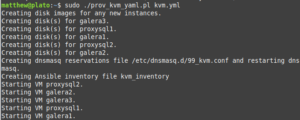
The differences between this and my script for Xen are few. Of note, this script uses virt-install instead of parsing configuration files. Because smaller thin-provisioned QCOW2 images can be used with KVM, the speed at which these virtual machines can be “spun up” is a lot quicker versus with Xen paravirtualization, which must use RAW disk image files.
Porting the script to Enterprise Linux
The script itself required no modification to run on Enterprise Linux (AlmaLinux/Rocky Linux/Red Hat/etc.). The only thing one could modify: on EL, the dnsmasq leases file defaults to /var/lib/dnsmasq/dnsmasq.leases, while on Debian/Ubuntu the default is /var/lib/misc/dnsmasq.leases. I chose to modify the setting in /etc/dnsmasq.conf, dhcp-leasefile, but you could also modify the subroutine in ProvVMs.pm (or I guess I could add some conditional logic to determine this).
There are a few differences with configuring KVM on an EL system, however. These steps should work on EL8/9 and as far as I know, 10 (I don’t currently have a free system that can run EL10, unless I do nested virtualization on my desktop).
- Disable SELinux or set it to permissive, unless you want to fight with it.
- Enable the EPEL and CRB repositories: sudo dnf install -y epel ; sudo crb enable.
- Install the packages: sudo dnf -y install bridge-utils qemu-kvm libvirt virt-install dnsmasq perl-YAML-LibYAML perl-Template-Toolkit
- Start and enable libvirtd: sudo systemctl enable –now libvirtd.
- The remaining steps can be skipped if you’re not using dnsmasq or VLANs. Either modify ProvVMs.pm to use the leases file /var/lib/dnsmasq/dnsmasq.leases or change the setting dhcp-leasefile in /etc/dnsmasq.conf to /var/lib/misc/dnsmasq.leases.
- Create the file /etc/dnsmasq.d/01-kvm.conf similar to the code snippet below.
- Start and enable dnsmasq: sudo systemctl enable –now dnsmasq.
- If firewalld is enabled, allow DHCP and DNS traffic through: sudo firewall-cmd –add-service dhcp –add-service dns –permanent && sudo firewall-cmd –reload
listen-address=::1,127.0.0.1,192.168.40.2
no-resolv
no-hosts
server=192.168.1.1
domain=ridpath.lab
dhcp-range=192.168.40.100,192.168.40.200,12h
dhcp-option=3,192.168.40.1
dhcp-option=6,192.168.40.2
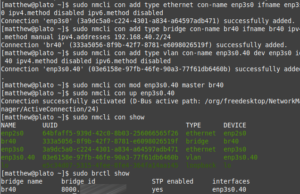
Network configuration on a stock Enterprise Linux installation uses NetworkManager—hate it or love it, that’s what you have to work with. It’s a lot of nmcli commands; I borrowed a lot from this tutorial. First, I will cover the steps for configuring a system with two NICs and VLANs, the second NIC being used for VM traffic (having two NICs is convenient, since you can mess around with a host’s networking setup while still being SSH’d into it.)
- Delete the connection for the second NIC: sudo nmcli con del interface
- Re-add the connection, but with IP disabled: sudo nmcli con add type ethernet con-name interface ifname interface ipv4.method disabled ipv6.method disabled
- Add the bridge. It will need an IP address if using dnsmasq: sudo nmcli con add type bridge con-name brvlan-id ifname brvlan-id ipv4.method manual ipv4.addresses 192.168.40.2/24
- Add the VLAN interface: sudo nmcli con add type vlan con-name interface.vlan-id dev interface id vlan-id ipv4.method disabled ipv6.method disabled
- Bind the VLAN interface to the bridge: sudo nmcli con mod interface.vlan-id master brvlan-id
- Bring up the VLAN inteface: sudo nmcli con up enp3s0.40
Below is a screenshot of these steps being performed:
Another option is to create a bridge on the single NIC. You will need to do this while on the console of the system (keyboard and monitor).
sudo nmcli con del enp2s0
sudo nmcli con add type bridge con-name br0 ifname br0 ipv4.method dhcp
sudo nmcli con add type bridge-slave con-name enp2s0 ifname enp2s0 master br0
sudo nmcli con up br0
Conclusion and future modifications
In the future I want to add the ability to create libvirt NAT networks with this script. These are networks with which libvirt manages the DHCP and are only accessible on the host itself. An advantage to using these is that they are portable and don’t require a managed switch or a complicated router setup. The disadvantage, of course, is that you have to be on the host to access the VMs. The reason I like the VLAN approach is that I can reach the VMs from another network if I choose to allow access. Using this approach has also challenged me to learn more about networking.
As I learn about more technologies, I may add new features to this script. As always, thanks for reading!