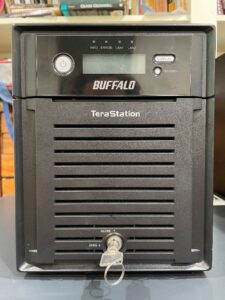
Installing Debian on an old Buffalo NAS

A while back I took home a 2011-vintage Buffalo TeraStation TS-XEL that was destined to be e-wasted. I initially used it in its stock configuration, deploying it as a “junk” NFS server to store software and act as a storage back-end for a test Proxmox cluster. I quickly grew tired of it, however, as the OS on it was outdated and used deprecated protocols. I also prefer to manage systems through the command line and this NAS only could be managed through its web interface. After the initial novelty of having a “new” piece of hardware to play with wore off, I deposited it in the closet with the other pieces of hardware that get taken out every few years.

Continue reading

Compiling Perl DBD::Oracle on Solaris 2.6 and writing some Perl scripts

One of my goals in my recent experimentation with Oracle and Solaris was to write some programs that could query and modify the data in a database. In my time as a systems administrator, I have written a number of Perl scripts that query Oracle using the DBD::Oracle module. For my lab experimenting, I wanted to be able to write scripts that could run against the late-90s Oracle 8i I installed on Solaris 2.6. Until now, my efforts at getting the DBD::Oracle module compiled on Solaris with the 8i client have failed. In this post I will write about how I finally got this to work.

Continue reading

Running Solaris 2.6 under the QEMU SPARC32 Emulator and installing Oracle 8i

Following up on my previous post, Running Solaris 8 and 9 under the QEMU SPARC32 Emulator, I decided to try running Sun Solaris 2.6 in the QEMU SPARC32 Emulator. Someone has graciously shared the CD images for both the SPARC and X86 Solaris 2.6 images out on the Internet Archive. I also installed the Oracle 8i database server and connected to it from Solaris 9 QEMU machine. My ultimate goal in this exercise was to query Oracle 8i with the Perl DBD::Oracle module, but I ultimately failed at this. More on this later. This post will be similar to my other one on Solaris 8/9 in QEMU, so I’m going to skip steps such as how to set up QEMU for this.

Create and format the disk for Solaris

Continue reading

Exploring Red Hat Linux 6.2 in 2025

Linux back when a 1999 Camry wasn’t a beater

Recently I found some ISOs out on the Internet Archive for Red Hat Linux 6.2—not the Red Hat Enterprise Linux we’re more familiar with today, but instead the the original version released by Red Hat. The reason I was happy to find this version was because it was the last one released for the SPARC architecture. Since I’ve been experimenting a lot with Sun Microsystems products, I was eager to try this out in the QEMU SPARC emulator (which I recently used to run Solaris 8/9 in). However, I first installed the x86 version of this OS in Virtual Box.
Continue reading

Running Solaris 8 and 9 under the QEMU SPARC32 Emulator

One of the really cool features of QEMU (Quick Emulator) is that it can emulate CPU architectures other than x86-64, such as PowerPC, AArch64, and SPARC. In my experimentation with Solaris, I’ve really wanted to try the SPARC and SPARC64 emulators with Solaris, and do something similar to this article: Build your own SPARC workstation with QEMU and Solaris. However, I really wanted to do this with Solaris 8/9/10, as 2.6 is more limited in what you can do with it. In particular, I wanted to run Solaris 8 in this, as installing 8 in VirtualBox is a hassle, with barely-functional graphics. In the end, I was only able to run Solaris in the 32-bit emulator, which emulates a SPARCstation 5 by default. The SPARC64 emulator can only run BSD and Linux variants, and not Solaris. In the future, I intend on writing another post on the SPARC64 emulator.

Continue reading

Installing Sudo and using Ansible to manage Solaris 9

Since I’ve started experimenting with Solaris in my home lab, I’ve really wanted to try managing systems with some sort of configuration management software. I originally thought about trying Rex, a Perl configuration management tool, but I’ve yet to take the time to learn it. I do, however, know Ansible, and it came as a welcome surprise to me that I can install Python, which is needed by Ansible, on Solaris without having to go through the hassle of compiling it from source. This is because Python can be installed using the pkgutil tool from OpenCSW. In addition, the community.general collection in Ansible includes a pkgutil module that allows Yum/Apt-like package management. One day I decided to see if Ansible would work on Solaris.

Note: your results may vary in following these directions; I can’t guarantee that they will work for you.

Prepare Solaris 9 for Ansible

Continue reading

Installing AlmaLinux 9 on a DL360 G7 and other stuff

Recently I borrowed a pair of HP DL360 G7 servers from the office that had been decommissioned and are eventually destined for the e-waste bin. The servers are from 2011 and have little practical use in 2025, either in production or as lab systems, as they are slow and power-hungry. Still, I thought they would be fun to tinker with at home for at least a little while.

The latest and greatest from 2011

The top server has two CPUs and 72GB of RAM, while the bottom one has one CPU and only 4GB of RAM. The top one has a bunch of old laptop SATA drives in it (two of which are dead), while the bottom one has HP Enterprise SAS drives, all of which still function, in a RAID 1+0 array. I started with the bottom one.

Continue reading

Configuring LDAP Authentication on Solaris 8/9/10

When I recently started getting back into Solaris, one of the things I wanted to get working was LDAP authentication, so that I can log into systems with the same set of credentials like in a business environment. As with most Solaris tasks, the information on how to set this up is scarce on the Internet, especially for Solaris 8 and 9.

I already had three LDAP instances set up in my lab environment: a primary instance and two replicas. This post will not cover the setup of these, but all three are AlmaLinux 9 containers running OpenLDAP 2.6. The replicas have been configured to allow non-SSL connections to them, for the purpose of authenticating legacy operating systems such as Solaris. I don’t recommend allowing this in a production environment of course. Perhaps at a later date I will work on configuring Solaris to connect to OpenLDAP via SSL, but even this will require allowing insecure versions of SSL/TLS.

Continue reading

Installing OpenSSH on Solaris 8 x86

As mentioned in a previous post, I recently purchased a SunBlade 100 workstation off eBay. The first operating system I installed on it was Solaris 8, as this was the only version of Solaris I had CD ISOs for and it only has a CD-ROM drive (later I was able to install Solaris 9 on it over the network). I was disappointed to find out that Solaris 8 didn’t come with OpenSSH preinstalled; it wasn’t until Solaris 9 that SSH was installed with the base OS. I also had an x86 Solaris 8 virtual machine running in VirtualBox that I wanted to be able to access from my Linux systems (installed using the steps here: https://github.com/mac-65/Solaris_8_x86_VM). I decided to try installing OpenSSH on the VM first, as I could take snapshots and revert to a working state if a step failed. Prior to starting these steps, I applied the below patches per mac-65’s guide:

  • The Solaris 8 x86 recommended patch cluster, found here.
  • Patch 112439-02, which provides /dev/random and /dev/urandom (needed to generate SSH keys), found here.

I didn’t have to apply any patches to my SunBlade 100.

Continue reading

Back to blogging in 2025

It’s been nearly four years since I’ve posted anything to this blog. In that span of time, I have learned so many new skills and systems administrator “hacks”, to the point that this blog seems to represent a version of myself several major releases old.

Back when I last posted to this blog, I was still new to Ansible, while still clinging to and believing in the superiority of Puppet. I’ve since warmed to Ansible and now use it for practically all of my configuration management, even having passed the RHCE, which tests primary on one’s Ansible knowledge. Meanwhile, I haven’t written Puppet code in at least three years.

I’ve also recently gained an interest in “retro” server computing, that is Unix and Linux (and possibly some Windows) from the late 90s to the late 2000s. The first job I had where I interacted with *nix systems had a mixture of RedHat Enterprise Linux 5 and Solaris 8/10 systems. Being a 24-year-old who had mostly experimented with Ubuntu and Fedora, I hated working on the Solaris systems, particularly the SunBlade 150 workstation I was given in a broken state and told to fix before I could “graduate” to the Unix support team. After fixing it, I was told to use it as my secondary desktop. I hated it: the ugly gray and purple case, the dated Window 3.1-like CDE UI, and the out-of-date software, having to compile many tools I wanted from source. When I had a chance to inherit a departing coworker’s x86 desktop running RHEL 5 (which I also found dated), I wasted no time in kicking the SB-150 out of my cubicle.

It would probably come as a surprise to my past self, then, that at age 37 I would willingly purchase another SunBlade workstation off eBay, an SB-100 with 50 less Mhz. Why would I willingly subject myself to such pain, when Solaris has become almost a memory? I suppose after a certain period of time, maybe 20 years or so, old and slow becomes cool again, sort of like 80s and 90s cars (well, for some people anyway). For me, getting old stuff to work has always been a delightful and brain-stimulating challenge.

What I’ve found, however, is that information on how to get things working on Solaris is scarce and scattered througout the Internet, and mostly pertains to Solaris 10 or newer. In this blog I’d like to—attempt to at least—share what I’ve learned. It will probably be of use to very few people, but there is always the chance it might help someone.

In sum: going forward, this blog might contain some posts on new stuff, old stuff, or I may just stop posting to it altogether like I usually do.

Warmly,
Matt Ridpath